
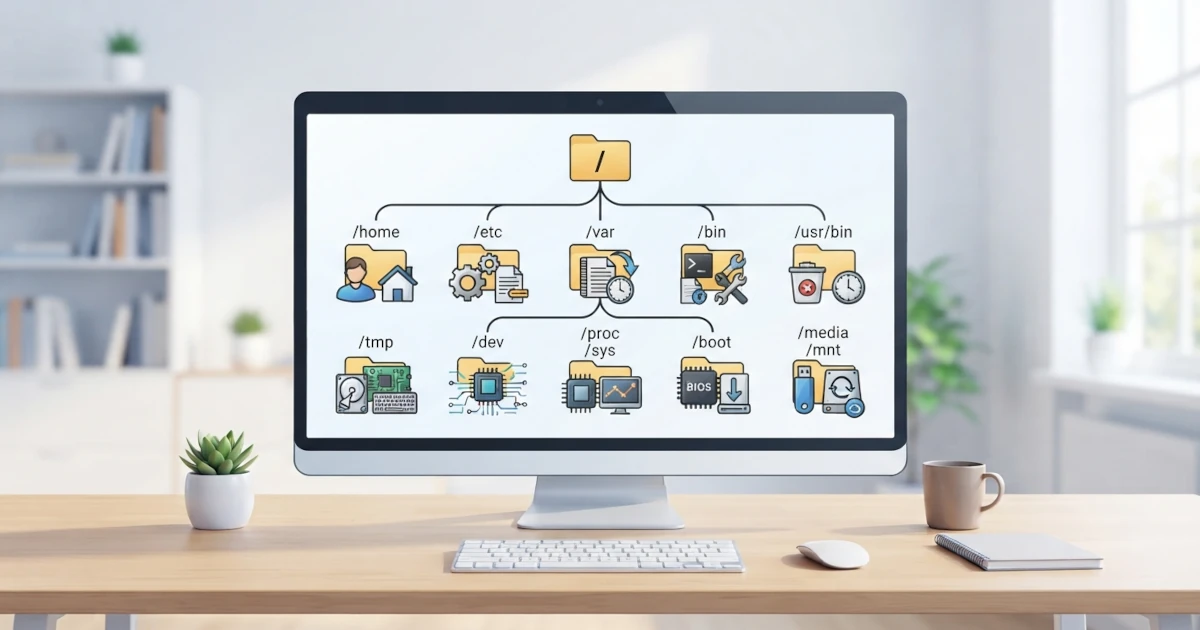
In the previous chapter, we learned the basic concepts of files and directories in Linux, including the philosophy that "everything is a file" and the fact that Linux has a single directory tree rooted at /. Now it is time to explore that tree structure in more detail. This chapter covers the Filesystem Hierarchy Standard (FHS), which is the standard governing directory layouts in Linux, explains the concepts of the root filesystem and mount points, and outlines the functions of each major directory we will frequently encounter, such as /home, /etc, /var, /proc, and others. Understanding this structure will make it easier to locate files, comprehend system operations, and troubleshoot issues.
12.1 Filesystem Hierarchy Standard (FHS)
The Filesystem Hierarchy Standard (FHS) is a specification that defines the directory structure and directory contents in Unix and Linux operating systems. Maintained by the Linux Foundation, this standard aims to ensure that software applications can predictably locate files and directories regardless of the Linux distribution being used.
Prior to this standard, each Linux distribution utilized a different directory layout, meaning a program built for one distribution might not find its required configuration files or libraries on another. Thanks to FHS, the locations of essential files are standardized: for instance, system configuration files reside in /etc, executables are located under /usr/bin, and variable data is stored in /var.
Both Ubuntu and Fedora follow FHS, so the directory structure covered in this chapter applies equally to both distributions. Nevertheless, FHS allows distributions flexibility for minor customizations, so slight differences may still exist between distributions.
12.2 Root Filesystem and Mount Points
As mentioned in the previous chapter, the entire Linux file system is rooted in a single top-level directory called root, represented by a single forward slash /. This root directory is the parent of all other directories on the system. When writing a path such as /home/username/Documents, the leftmost forward slash refers to this root directory.
The second key concept is the mount point. A mount point is an empty directory used as an entry point for a filesystem. When a partition or storage device is mounted to a mount point, the contents of that partition appear inside that directory.
To illustrate, when plugging in a USB flash drive, the system may mount it to a directory such as /media/username/flashdrive-name. Subsequently, all files on the flash drive become accessible through that directory, as if they were natively part of the main directory tree. This mount point mechanism allows the entire system to appear unified, even though it may physically consist of separate partitions and storage devices.
12.3 Overview of Main Directories
The following details the functions of the primary directories within a Linux system. The table below provides a quick summary, followed by a detailed explanation for each directory.
| Directory | Function |
|---|---|
/ | Root: the parent of all directories |
/home | Standard user home directories |
/root | Home directory for the root user |
/bin, /sbin, /usr/bin | Programs and system binaries |
/etc | System configuration files |
/var | Variable data (logs, mail, spool) |
/tmp | Temporary files |
/dev | Device files |
/run | Runtime data since last boot (virtual, tmpfs) |
/proc | Process and kernel information (virtual) |
/sys | Hardware information (virtual) |
/lib, /usr/lib | Shared libraries |
/media, /mnt | Mount points for removable media |
/opt | Third-party application software |
/boot | Boot loader files |
12.3.1 /: Root
The root directory / is the apex of the entire directory hierarchy. No directory exists above it, and all other files and directories descend from it. Generally, the root directory contains subdirectories specified by FHS and ideally contains very few direct files. Most system activity and data reside within its subdirectories.
12.3.2 /home: User Directories
/home serves as the primary data storage location for regular users. Each user has a dedicated subdirectory, such as /home/username, containing personal documents, downloads, images, and user-specific configuration files.
This home directory also stores various dotfiles and configuration directories, such as .bashrc and .config, discussed in the previous chapter. Saving documents to the Documents or Downloads folder via a graphical interface writes files directly to that user's home directory by default. Keeping critical data in /home simplifies backups, as all personal data remains centralized.
12.3.3 /root: Home of Root
/root is the home directory specifically for the root user, the system administrator account. Note that /root is distinct from the root directory /. The /root directory is simply a dedicated home directory for the superuser, whereas / is the base of the entire filesystem.
The superuser home directory is intentionally kept separate from /home because /home on some systems may reside on a separate partition or a network mount. By keeping it separate, root can log in and perform maintenance even if the /home partition encounters issues.
12.3.4 /bin, /sbin, and /usr/bin: Programs and Commands
These directories store executable binaries and commands executed in the terminal:
/usr/bincontains most daily user commands, such asls,cp,mv,cat, andnano./usr/sbincontains system administration binaries typically run by root or viasudo, such asfdisk,useradd, andshutdown./binand/sbinhistorically contained essential utilities required during system boot. However, modern distributions like Ubuntu 26.04 and Fedora 44 generally merge these directories into symbolic links pointing to/usr/binand/usr/sbin. This means all system commands effectively reside under/usr.
Consequently, when a command is typed, the system searches for the executable within directories listed in the PATH environment variable, which typically includes /usr/bin and /usr/sbin.
12.3.5 /etc: System Configuration
/etc stores global system configuration files. Nearly all machine-wide settings that apply to all users rather than a single user are located here.
Key files and subdirectories inside /etc include:
/etc/passwd: User account information./etc/fstab: Filesystem mount configuration applied at boot./etc/hosts: Local host name resolution mapping./etc/apt/: APT package manager configuration (Ubuntu)./etc/yum.repos.d/: DNF repository configuration (Fedora)./etc/systemd/: Systemd service configurations.
Linux convention refers to these as config files, and many are stored as plain text, allowing them to be read and edited using text editors. Much of the configuration material in this book references files located within /etc.
12.3.6 /var: Variable Data
/var stores files to which the system writes data dynamically during operation. The name var derives from the word variable. Unlike /usr, which remains largely static, the contents of /var continuously change as system processes execute.
Important subdirectories within /var include:
/var/log: System and application log files./var/mail: User mail spools./var/spool: Queued tasks for printing and scheduled jobs./var/cache: Application cache data./var/lib: Persistent state data for applications and package managers.
When troubleshooting system issues, the /var/log directory is one of the primary locations to inspect.
12.3.7 /tmp: Temporary Files
/tmp is used for temporary storage by applications and users. Many applications utilize /tmp to write intermediate data required only for short durations.
The defining characteristic of /tmp is that its contents are volatile. On modern Ubuntu and Fedora installations, /tmp is typically mounted as a tmpfs filesystem, meaning it resides in RAM rather than physical disk storage. As a result, files in /tmp are cleared automatically upon system shutdown or reboot. This occurs due to the non-persistent nature of RAM. Furthermore, the systemd-tmpfiles service routinely purges stale files from /tmp (by default, files unaccessed for 10 days), even without a system reboot. Given its RAM-backed nature, critical data or large files should never be stored in /tmp, as doing so consumes system memory allocated for active running applications.
12.3.8 /dev: Device Files
/dev contains device files, which are special nodes representing hardware devices. As outlined in the previous chapter, Linux abstracts physical hardware device interfaces as files.
Common device files in /dev include:
/dev/sda: The primary hard disk or SSD./dev/sda1: The first partition on/dev/sda./dev/tty: Terminal interfaces./dev/null: A virtual device that discards all data written to it./dev/random: A pseudo-random number generator.
Direct manual interaction with files in /dev is rarely necessary, but understanding their presence reinforces the core concept that "everything is a file."
12.3.9 /run: Runtime Data Since Last Boot (Virtual)
/run stores system runtime data, providing state information that is valid only since the current boot session. Similar to /tmp on modern systems, /run is mounted as a volatile tmpfs filesystem in memory, causing its structure to recreate cleanly at every boot.
Core system services, including systemd, write runtime state such as PID files (process identifiers for running daemons), UNIX domain sockets for inter-process communication, and current boot status into /run. This directory replaces the legacy /var/run directory found in older distributions; per modern FHS standards, /var/run is typically maintaining compatibility as a symlink pointing directly to /run.
12.3.10 /proc: Process and Kernel Information (Virtual)
/proc is a virtual pseudo-filesystem that exposes running process information and kernel parameters. It does not exist as physical files on disk; instead, the kernel dynamically generates its content upon access.
Each running process corresponds to a numerical directory matching its Process ID (PID). For example, /proc/1234 exposes runtime metrics for process ID 1234. In addition, /proc holds system wide diagnostic endpoints such as /proc/cpuinfo (CPU metrics) and /proc/meminfo (RAM utilization).
12.3.11 /sys: Hardware Information (Virtual)
Similar to /proc, the /sys directory is a virtual pseudo-filesystem. However, /sys specifically exposes structured information regarding hardware devices, drivers, and kernel subsystems. Through /sys, software components and utilities can query and, in specific cases, modify live kernel and hardware parameters.
The content of /sys is strictly managed by the kernel and rarely requires manual edits by standard users. The operational model of /sys and /proc demonstrates the power of file abstraction in Linux, allowing internal kernel states to be inspected as files.
12.3.12 /lib and /usr/lib: Shared Libraries
The /lib and /usr/lib directories store shared dynamic libraries required by system binaries. Shared libraries act as reusable software modules, enabling programs to invoke common functionality without embedding duplicate codebase logic inside every executable.
On modern distributions utilizing a merged usr design, /lib functions as a symbolic link pointing to /usr/lib, mirroring the structure of /bin. These library files are critical to operating system operations; corrupting or removing key shared libraries can prevent programs and system services from executing.
12.3.13 /media and /mnt: Removable Media Mount Points
/media and /mnt provide standardized locations for mounting storage filesystems, particularly external or removable media like USB drives and external hard disks.
/mediais used by automated desktop desktop subsystem routines for mounting hot-plugged devices. Plugging in a USB drive automatically attaches it under/media/username/drive-label./mntis reserved for manual temporary mounts performed by system administrators, such as temporarily attaching a partition using the explicitmountutility.
12.3.14 /opt: Third-Party Software
/opt (short for optional) is allocated for installing standalone third-party application software packages that do not follow standard FHS path distributions. Commercial, proprietary, or self-contained applications often deploy their entire file structure into a single subfolder such as /opt/application-name.
Software packages installed through official distribution package managers (such as APT or DNF) rarely use /opt, placing files under /usr instead. The /opt hierarchy remains utilized primarily by custom manually installed enterprise applications or third-party software vendor packages.
12.3.15 /boot: Boot Loader Files
/boot contains essential files required to initialize and boot the system operating environment. Key components include the Linux kernel image (typically named vmlinuz-...), the initial RAM disk image (initrd or initramfs), along with configuration files and modules for the boot loader (such as GRUB).
The /boot directory is critical to the bootloader process. Consequently, contents within /boot must not be altered or removed carelessly, as corruption within this directory can render the system unbootable.
In this chapter, we explored the Filesystem Hierarchy Standard (FHS), core concepts involving root filesystems and mount points, and the precise roles of primary Linux directories including /home, /etc, /var, /tmp, /dev, /run, /proc, /sys, /boot, and related paths. Mastering this layout serves as a roadmap when navigating system storage, locating configuration files, analyzing log output, or performing system diagnostics.
In the next chapter, we will continue our examination of the filesystem architecture by detailing disk partitioning, filesystem formats like ext4, XFS, and Btrfs, alongside swap management and mounting operations.