
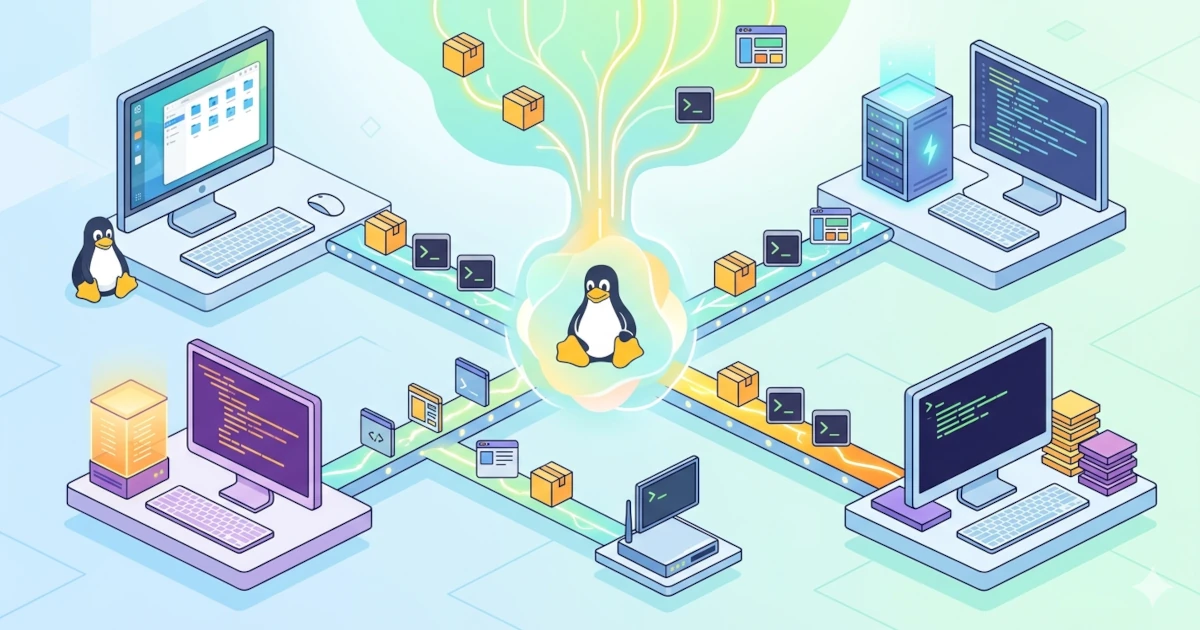
The previous chapter explained that Linux is technically just a kernel, the core of the operating system that interacts directly with hardware. A kernel alone is not enough to be an out-of-the-box, ready-to-use daily operating system. This component needs to be equipped with a shell, system utilities, a package manager, and various other components so that users can actually use it for work.
The question that arises is: who collects, configures, and packages all these components into a single ready-to-use system?
This is where Linux distributions (Linux distribution or distro) come into play. Understanding this concept is key to navigating the vast Linux ecosystem with greater confidence.
4.1 What Is a Distribution (Distro)?
In the Linux ecosystem, the term distribution or often abbreviated as distro refers to a complete operating system built on top of the Linux kernel. A distribution is not just a kernel, but a comprehensive package consisting of:
- Linux kernel: the system core that manages hardware, processes, and memory.
- GNU utilities: a collection of basic programs such as
ls,cp,bash, andgrepfrom the GNU project. - Init system: the first program executed after the kernel is active, usually systemd in modern distros.
- Package manager: a system for installing, updating, and removing software.
- Desktop environment (optional): a graphical user interface such as GNOME, KDE Plasma, or XFCE.
- Pre-installed applications: web browsers, text editors, file managers, and so on.
- Default configurations: initial settings for networking, security, locale, and others.
Distribution creators, whether commercial companies like Red Hat or Canonical, or volunteer communities like the Debian Project, are responsible for selecting these components, compiling them, testing them, and distributing them to users.
An easy analogy is that if the Linux kernel is a car engine, then a distribution is the complete car ready to drive, complete with bodywork, seats, steering wheel, dashboard, and various different features depending on the brand. The engine is the same, but the driving experience can be very different.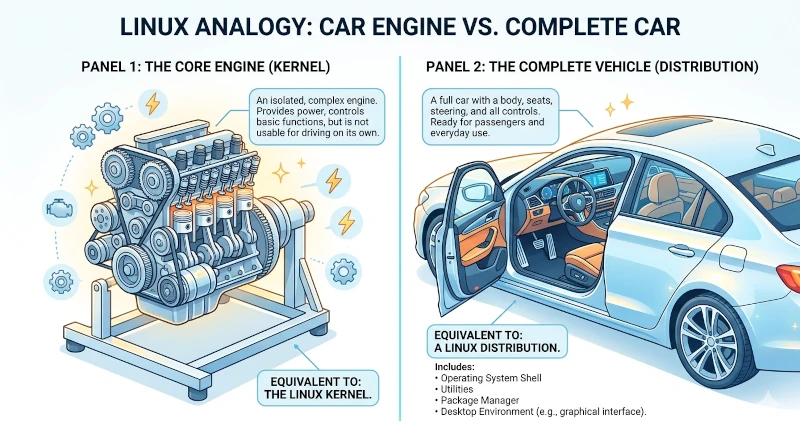
4.1.1 Components That Distinguish One Distro from Another
All distros use the same Linux kernel (although versions may vary), so the differences between them lie in the layers above it:
| Component | Example Variations |
|---|---|
| Package manager | APT (Debian/Ubuntu), DNF (Fedora/Red Hat), Pacman (Arch) |
| Package format | .deb (Debian/Ubuntu), .rpm (Red Hat/Fedora), source tarball (Gentoo) |
| Init system | systemd (majority of modern distros), OpenRC (Gentoo, Alpine) |
| Default desktop environment | GNOME, KDE Plasma, XFCE, Cinnamon |
| Release model | Fixed release vs rolling release |
| Target user | Beginners, developers, servers, power users |
| Licensing philosophy | Free software only, or allowed to include proprietary software |
These choices give each distro its own distinct character and personality.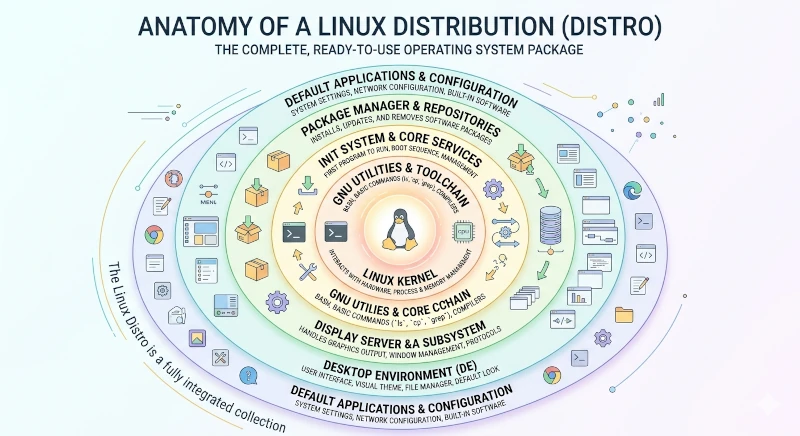
4.2 Why Are There So Many Distros?
One of the first confusing things for beginners is why there are so many options. The website DistroWatch (distrowatch.com), which has been tracking Linux distribution developments since 2001, records over 300 active distributions to date.
The answer is directly linked to the open-source nature of Linux itself.
4.2.1 Freedom as the Root of Diversity
The Linux kernel is released under the GNU General Public License (GPL), an open-source license that grants anyone the freedom to:
- Run the program for any purpose.
- Study how the program works and modify it.
- Redistribute copies to others.
- Distribute modified versions to others.
This freedom means that anyone, whether an individual, a community, or a company, can take the Linux source code, modify it, and release their own distribution as long as they comply with the GPL terms.
4.2.2 Different Needs Spawn Different Solutions
Distro diversity is not just a technical phenomenon; it stems from the fact that user requirements vary greatly:
- Server vs desktop: Server distributions like RHEL or Ubuntu Server are optimized for long-term stability and remote management. Desktop distributions like Ubuntu Desktop or Fedora Workstation prioritize daily ease of use.
- Stability vs bleeding-edge technology: Debian is famous for its highly conservative release policy in pursuit of maximum stability. Arch Linux, on the other hand, embraces a rolling release model that always includes the latest versions of every software package.
- Ease of use vs full control: Ubuntu is designed to be ready to use immediately for beginners right after installation. Arch Linux requires users to build their system manually from scratch, component by component, offering complete control alongside a steep learning curve.
- Specialized purposes: Some distros are tailored specifically for digital forensics and cybersecurity (Kali Linux), system recovery (system rescue), privacy and anonymity (Tails), or router and embedded devices (OpenWrt).
- Philosophy and ideology: Some distros like Trisquel or GNU Guix refuse to include any components that are not completely free software according to the FSF (Free Software Foundation) definition. Other distros take a pragmatic approach by bundling proprietary drivers and firmware for broader hardware compatibility.
The Linux distro ecosystem reflects freedom of choice and the diversity of real-world needs.
In practice, the temptation to distro-hop continuously is strong, especially for beginners new to this ecosystem. As a practitioner note, it is recommended to stick with one distro for a few weeks before switching. Most issues that initially feel like a "distro flaw" are actually part of a natural learning curve that disappears once you become accustomed to using the system daily.
4.3 Linux Distribution Families
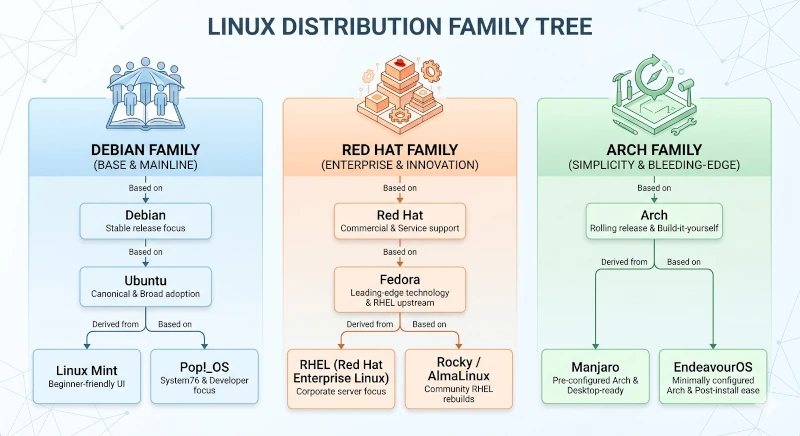
Although there are hundreds of distributions, most were not built from scratch. The majority are derivatives of a few established parent distributions. Understanding this family tree is far more useful than trying to memorize individual distro names one by one.
There are three main families dominating the Linux ecosystem, primarily defined by the package managers and package formats they use.
4.3.1 Debian/Ubuntu Family: APT and .deb Format
Debian GNU/Linux is one of the oldest Linux distributions still active today. Ian Murdock founded the Debian project on August 16, 1993. The name is a portmanteau of his girlfriend's name, Debra, and his own name. A volunteer community runs Debian completely independently without affiliation to any corporation.
Debian is known for its commitment to free software, outlined in the Debian Social Contract and the Debian Free Software Guidelines (DFSG). These documents serve as a reference for many other open-source projects. Additionally, Debian is known for its highly cautious release cycle. The Debian team only releases a new version after all packages are proven sufficiently stable, a process that can take two to three years.
Debian's package management system uses the .deb format and the APT (Advanced Package Tool) package manager, which was subsequently inherited by all of its derivatives.
Ubuntu is the most influential derivative of Debian. Canonical Ltd., a company founded by South African entrepreneur Mark Shuttleworth, launched Ubuntu in October 2004 with the mission of making Linux accessible to everyone. The name Ubuntu originates from the South African Bantu philosophy meaning humanity toward others (I am what I am because of who we all are).
Ubuntu introduced the LTS (Long Term Support) concept, a release issued every two years that receives security updates for five years. This makes it a dependable choice for production environments and users who prioritize stability.
The Ubuntu ecosystem is vast. Beyond the main distribution featuring GNOME as the default desktop environment, there are several official Ubuntu flavors using different desktop environments:
- Kubuntu: uses KDE Plasma
- Xubuntu: uses XFCE
- Lubuntu: uses LXQt, lightweight for older hardware
- Ubuntu MATE: uses MATE Desktop
Many other popular distributions are also based on Ubuntu:
- Linux Mint: highly popular among beginners transitioning from Windows, offering a familiar interface
- Pop!_OS: developed by System76, focusing on developers and creators
- elementary OS: a macOS-inspired interface prioritizing aesthetics and usability
4.3.2 Red Hat/Fedora Family: DNF and .rpm Format
Red Hat was founded in 1993 and became one of the pioneers in commercializing Linux. Red Hat popularized a unique business model where its software is open-source and free to download, while generating revenue from support services, certifications, and enterprise subscriptions.
This model proved extremely successful. In 2019, IBM acquired Red Hat for 34 billion USD, marking one of the largest software acquisitions in history.
Red Hat's flagship product is RHEL (Red Hat Enterprise Linux), designed for enterprise environments with guaranteed stability and long-term support for up to ten years. RHEL uses the .rpm package format (Red Hat Package Manager) and the DNF package manager (Dandified YUM).
To test and develop technologies that will eventually land in RHEL, Red Hat sponsors the community-driven Fedora Project, which launched its distribution in November 2003. Fedora serves as the upstream for RHEL. Red Hat adopts battle-tested innovations from Fedora into subsequent RHEL releases.
Fedora is consistently among the first distributions to adopt cutting-edge technologies due to its role as an innovation laboratory. These technologies include the latest GNOME versions, newer Linux kernels, and Wayland as the default display server.
There are several important distros outside the core Red Hat ecosystem that also use RPM:
- CentOS (Community ENTerprise OS): formerly an unbranded, free rebuild of RHEL. In 2021, CentOS transitioned into CentOS Stream, which now serves as the upstream for RHEL.
- Rocky Linux and AlmaLinux: created as replacements for classic CentOS, providing binary-compatible and free RHEL rebuilds.
- openSUSE: an independent RPM-based distribution from SUSE (a German company), utilizing the Zypper package manager and a graphical configuration tool named YaST. openSUSE comes in two variants: Leap (a fixed release built from the exact same sources and binaries as SUSE Linux Enterprise (SLE), making it rock-solid) and Tumbleweed (a rolling release).
4.3.3 Arch Linux Family: Pacman and Rolling Release
Arch Linux is a distribution born from a vastly different philosophy. Judd Vinet designed Arch Linux and first released it in March 2002. Arch adheres to two core principles: simplicity and user-centricity.
Simplicity in the context of Arch does not mean easy to use; in fact, it is the opposite. Arch does not provide a graphical installer to configure everything automatically. Users must install it manually via the command line, selecting every component to install and configuring the system from scratch. The result is a highly tailored system free of bloatware, giving the user a deep understanding of every component.
Arch follows a rolling release model. There is no Arch 1.0 or Arch 2.0. The system receives continuous updates, ensuring users are always running the latest version of all software. This contrasts with fixed-release distros like Ubuntu, which publish new releases every six months and LTS builds every two years.
Arch's package manager is Pacman. Its ecosystem is enriched by the AUR (Arch User Repository), a community-driven repository containing thousands of user-submitted packages not found in official repositories. In practice, sysadmins and power users should remain cautious when using the AUR, as packages there undergo no official audit by the Arch team. Before installing, it is good practice to inspect the PKGBUILD script to ensure no suspicious commands are present.
Arch is a favorite choice for users wanting to learn Linux deeply because the installation and usage process forces a hands-on understanding of how the system functions.
Several Arch-based distributions exist to bridge the gap by offering easy installation without sacrificing Arch's advantages:
- Manjaro: Arch-based with a graphical installer and multiple desktop environments selectable during setup
- EndeavourOS: closer to vanilla Arch but equipped with a friendlier installer
4.3.4 Other Notable Distributions
A few other distributions deserve mention due to their historical significance or unique approaches outside the main three families:
Slackware: Patrick Volkerding first released Slackware on July 17, 1993, making it the oldest actively maintained Linux distribution today. Its philosophy is heavily minimalist and UNIX-like. Slackware lacks automatic dependency resolution, meaning system configuration must be handled manually via text files. Slackware values simplicity and consistency, though it carries a steep learning curve.
Gentoo: The Gentoo Foundation maintains Gentoo, which was first released in 2002. Gentoo is a source-based distro, meaning the installation process compiles every piece of software directly from source code on the user's machine. This approach enables fine-grained optimizations via USE flags, allowing users to define exactly which features to compile. Gentoo is popular among power users who want granular control over system details.
Alpine Linux: An ultra-lightweight distribution built on musl libc (instead of glibc) and BusyBox (instead of GNU utilities). Alpine is widely used in the container world (Docker) owing to its minimal image size. This system does not use systemd.
4.4 Choosing the Right Distro
With hundreds of choices available, the following guiding questions can help determine the most suitable distribution:
4.4.1 What Is the Primary Purpose?
- Learning Linux from scratch: Ubuntu, Fedora, or Linux Mint are top choices. They offer extensive documentation, large communities, and readily available troubleshooting resources.
- Servers and production: RHEL, Ubuntu Server, or RHEL derivatives like Rocky Linux or AlmaLinux. All three offer long support lifecycles critical for server environments.
- Understanding Linux deeply: Arch Linux or Gentoo will force you to understand every layer of the system.
- Specialized use cases: Use distros specifically tailored for security, privacy, or embedded requirements.
4.4.2 What Is Your Instability Tolerance?
Rolling release models like Arch or bleeding-edge distros like Fedora provide the newest software, but updates can occasionally introduce unexpected changes or require manual intervention.
Fixed release models like Ubuntu LTS or Debian are more conservative. Users won't receive the newest features immediately, but the system tends to be more stable and predictable.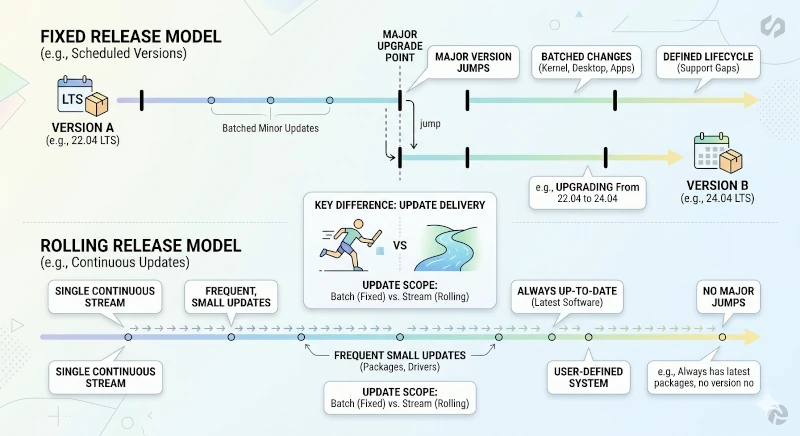
4.4.3 How Large Is the Community and Documentation Quality?
A large community translates to more tutorials and forum answers. Ubuntu and Fedora have active user bases. The ArchWiki (wiki.archlinux.org) is recognized as one of the most comprehensive Linux documentation resources available, useful even for non-Arch users.
4.4.4 Are Specific Software Packages or Drivers Required?
Some distros simplify the installation of proprietary drivers (such as NVIDIA GPUs) more than others. Ubuntu includes an Additional Drivers menu to streamline this setup. Fedora enforces strict policies against proprietary software in its default repositories but offers RPM Fusion as an additional repository.
A common pitfall for junior sysadmins is adding too many third-party repositories (PPAs in Ubuntu or COPR in Fedora) simultaneously without vetting the source. The more active external repositories you have, the higher the risk of dependency conflicts during apt upgrade or dnf upgrade operations. A safer practice is to add third-party repositories only when strictly necessary and from trusted sources.
4.5 Distros for Beginners: Ubuntu and Fedora
This series uses two primary distributions as reference points: Ubuntu 26.04 LTS and Fedora Workstation 44, both released in April 2026. Both serve as excellent entry points for beginners, albeit with distinct characteristics. Understanding these differences helps in selecting the ideal match for your needs and preferences.
4.5.1 Ubuntu 26.04 LTS: Resolute Raccoon
Ubuntu 26.04 LTS (Long Term Support) is a version of Ubuntu released on April 23, 2026, under the code name Resolute Raccoon. Ubuntu follows a naming convention of two words starting with the same letter in alphabetical sequence, always featuring an animal.
This release receives security support and updates from Canonical for:
- 5 years (until April 2031) for standard Ubuntu Desktop and Server editions.
- 10 years via the Ubuntu Pro and ESM (Expanded Security Maintenance) programs (until April 2036).
- 15 years through the Legacy add-on (until April 2041).
Key Characteristics of Ubuntu 26.04 LTS
Debian-based. Canonical builds Ubuntu on top of Debian testing or unstable with custom tuning and additions. This means Ubuntu inherits Debian's ecosystem reliability while offering Canonical's user-friendly enhancements.
GNOME 50 as default desktop environment. Ubuntu 26.04 LTS includes GNOME 50 (code-named "Tokyo") customized with the Ubuntu Dock and signature Ubuntu visual tweaks. This is also the first LTS release to completely drop X11/Xorg, providing only Wayland sessions.
Linux Kernel 7.0 and Rust migration. Ubuntu 26.04 LTS uses Linux kernel 7.0. In line with the memory-safety movement across the Linux ecosystem, Canonical began replacing several core system utilities with Rust-based equivalents, such as sudo-rs (replacing sudo) and uutils (replacing parts of GNU coreutils).
APT package manager. Beyond Ubuntu's official software repositories, users can utilize PPAs (Personal Package Archives) to install packages absent from official sources.
Built-in Snap support. Ubuntu integrates Snap, a sandboxed package format developed by Canonical. Several applications come pre-packaged as Snaps by default in Ubuntu.
Broad hardware compatibility. Canonical collaborates with hardware vendors (Dell, HP, Lenovo, Framework) to ensure Ubuntu runs smoothly out of the box. The Ubuntu Certified Hardware program guarantees compatibility across hundreds of laptop and workstation models.
Who Is Ubuntu LTS For?
Ubuntu LTS is ideal if you:
- Are learning Linux and want a smooth experience backed by vast documentation.
- Require a stable long-term system without frequent major upgrades.
- Work in environments that prioritize compatibility and predictability.
4.5.2 Fedora Workstation 44
Fedora Workstation 44 is the 44th release of the Red Hat-sponsored community distribution. The Fedora Project released Fedora Workstation 44 on April 28, 2026. Fedora Workstation positions itself as a desktop Linux distribution at the forefront of Linux technology.
Unlike Ubuntu LTS, Fedora does not offer an LTS release. Each Fedora version is supported for approximately 13 months, encouraging users to upgrade regularly to newer releases.
Key Characteristics of Fedora Workstation 44
Vanilla GNOME 50. Fedora Workstation 44 ships with GNOME 50 in its purest form without heavy modifications. It offers one of the best ways to experience GNOME as intended by the upstream GNOME development team.
DNF5 package manager. Fedora utilizes DNF (Dandified YUM) with repositories expandable via RPM Fusion. This community repository supplies multimedia codecs and proprietary GPU drivers excluded from official Fedora repos. Starting with Fedora 41, the default implementation switched to DNF5, rewritten in C++ (previously Python-based) for faster and lighter performance. Fedora 44 completely removes YUM, leaving DNF5 as the sole package manager.
Always cutting-edge. Fedora is frequently the first distribution to adopt emerging standards, such as Wayland as the default display server, PipeWire for audio management, systemd, and Btrfs as the default file system. Fedora Workstation 44 runs Linux kernel 6.19 and marks the complete removal of the GNOME X11 session, mirroring Ubuntu 26.04 LTS.
Upstream for RHEL. Red Hat adopts features and packages tested in Fedora into future RHEL versions. This makes Fedora an innovation lab and an early window into the direction of enterprise Linux.
Strict free software policies. Fedora excludes proprietary software or legally complex codecs from its primary repositories. Users can bypass this limitation easily by enabling RPM Fusion.
Who Is Fedora Workstation For?
Fedora is ideal if you:
- Want access to the latest versions of GNOME and underlying Linux technologies.
- Are interested in the Red Hat ecosystem and enterprise Linux technology directions.
- Are comfortable performing system upgrades every six months.
- Prefer a clean, unmodified GNOME user experience.
4.5.3 Quick Comparison: Ubuntu 26.04 LTS vs Fedora Workstation 44
| Aspect | Ubuntu 26.04 LTS | Fedora Workstation 44 |
|---|---|---|
| Base | Debian | Independent (upstream for RHEL) |
| Package manager | APT | DNF |
| Package format | .deb | .rpm |
| Desktop environment | GNOME 50 (customized, Wayland-only) | GNOME 50 (vanilla, Wayland-only) |
| Linux kernel | 7.0 | 6.19 |
| Default filesystem | ext4 | Btrfs |
| Release model | Fixed release (LTS every 2 years) | Fixed release (approx. every 6 months) |
| Support cycle | 5 years (10 years with Ubuntu Pro) | approx. 13 months |
| Software freshness | Conservative | Cutting-edge |
| Proprietary software | Out-of-the-box support (drivers, codecs) | Requires extra repo (RPM Fusion) |
| Sponsor | Canonical Ltd. | Red Hat / Fedora Project |
Both distributions provide solid foundations for embarking on your Linux journey. Neither option is objectively superior, as the right choice depends on individual priorities and requirements.
The Linux distribution ecosystem may seem vast at first glance. However, underlying this diversity is a simple logic: because Linux is open source, anyone is free to take the same kernel and construct a unique user experience. Three main families dominate the landscape: Debian/Ubuntu using APT and .deb files, Red Hat/Fedora using DNF and .rpm files, and Arch Linux using Pacman alongside a rolling release philosophy. Most distros encountered in the wild are derivatives of one of these primary families.