
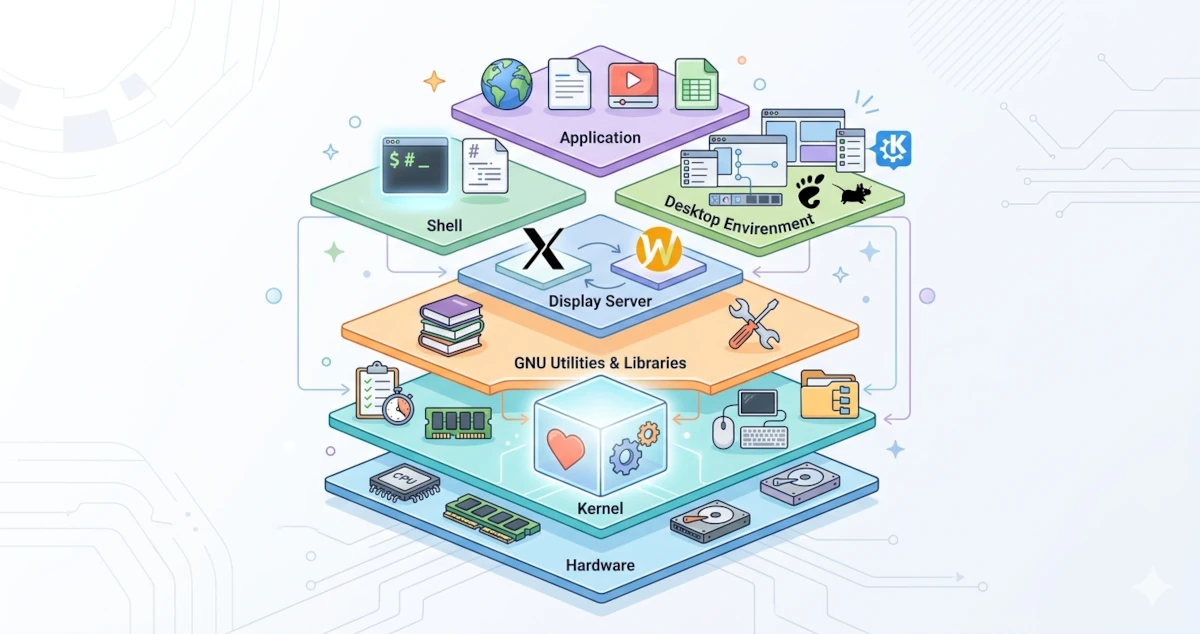
The previous chapter mentioned that Linux is technically just a kernel, the core of the operating system that directly interacts with hardware. To become a functional operating system, the kernel requires various software components, each serving a specific role.
Understanding these components is crucial because it helps us read error messages more accurately, comprehend how the system works, and navigate Linux with greater confidence without relying on memorizing commands.
We can draw an analogy between the Linux system and a restaurant. The kernel is the kitchen: where all the heavy lifting happens, hidden away from guests. The shell is the waiter taking our orders and conveying them to the kitchen. The desktop environment is the dining room we see and feel. Each part has its own function, but all must work together for the restaurant to operate.
Let us examine these components one by one.
3.1 Linux System Layers
Let us look at the big picture of how Linux components are structured before diving into details. A Linux system can be imagined as a stack of layers. The bottom layer is the physical hardware, while the top layer consists of the applications we use daily. In between lie the kernel, various GNU libraries and utilities, the display server, and the desktop environment (or shell if operating without a graphical interface).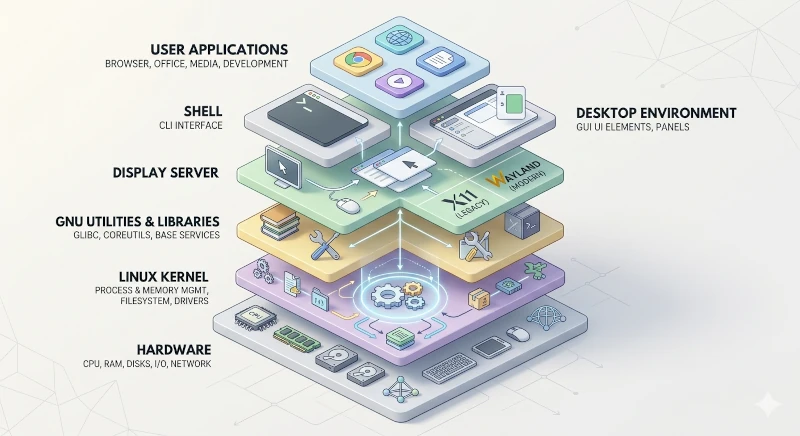
Each layer only communicates directly with the layers immediately below and above it. Applications do not need to know hardware details because that falls under the kernel's responsibility. The kernel does not need to know how to render windows, as that is handled by the display server and desktop environment.
3.2 The Linux Kernel
The kernel is the heart of the entire system. This component is the only part of the operating system that runs directly at the hardware level, in a space known as kernel space, a protected memory area accessible exclusively by the kernel itself.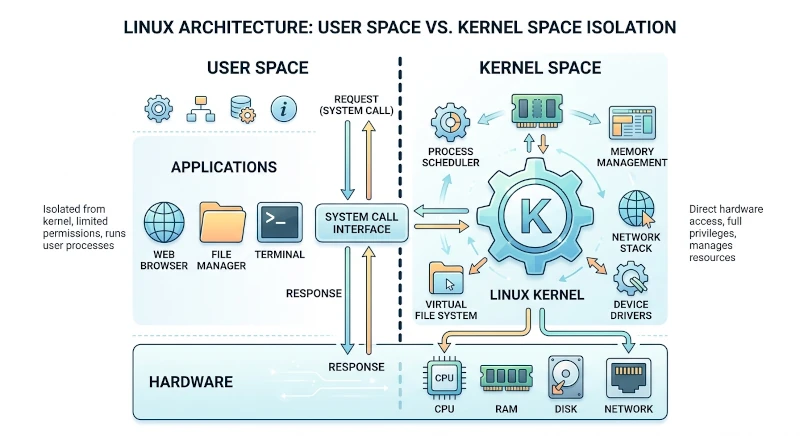
All programs we execute, such as web browsers, terminals, or text editors, operate in user space. Programs requiring hardware access, such as reading files, transmitting data over a network, or displaying content on screen, must request permission from the kernel via a mechanism called a system call (syscall).
This separation between kernel space and user space forms the foundation of Linux system security. A program experiencing a crash in user space cannot directly compromise the entire system because it lacks direct access to hardware or the memory of other programs. The kernel handles all management tasks.
3.2.1 Linux Kernel: Monolithic with Modules
Linux utilizes a monolithic kernel architecture. Most core functions, process management, memory management, device drivers, and filesystem management, are compiled into and run within a single code block inside kernel space.
A monolithic kernel architecture is more efficient than a microkernel (used by systems like MINIX or QNX) because its components can communicate directly without the overhead of context switching.
The Linux kernel also supports loadable kernel modules (LKMs), code segments that can be loaded into the kernel on demand and unloaded when no longer needed without requiring a system reboot. Nearly all device drivers in Linux are implemented as modules. We can inspect currently loaded modules using the following command:
lsmod3.2.2 Process Management
Every running program in Linux is a process. The kernel creates a new process when we open a browser. The browser might spawn additional processes when opening new tabs. A freshly booted system already has dozens to hundreds of processes running in the background.
The kernel holds full responsibility for process management through several mechanisms:
Process scheduling
A physical CPU core can only execute one instruction at a time per core. However, we can run hundreds of programs simultaneously. The kernel uses a scheduler to allocate CPU time among all active processes. Each process receives a turn to utilize the CPU in very brief time slots, typically a few milliseconds. This switching occurs so rapidly that humans perceive it as true multitasking.
The Linux kernel has used the Completely Fair Scheduler (CFS) as its default scheduler since kernel version 2.6.23. CFS distributes CPU time fairly among all active processes by factoring in each process's priority (niceness). Starting with kernel 6.6 in 2023, Linux introduced the EEVDF (Earliest Eligible Virtual Deadline First) scheduler as a refinement to CFS, offering lower latency and more precise time distribution. Kernel 7.0, serving as the foundation for Ubuntu 26.04 LTS and available to Fedora Workstation 44 via regular updates, added the sched_ext framework, allowing custom eBPF-based schedulers to be installed and swapped dynamically without kernel recompilation, while EEVDF remains the default scheduler.
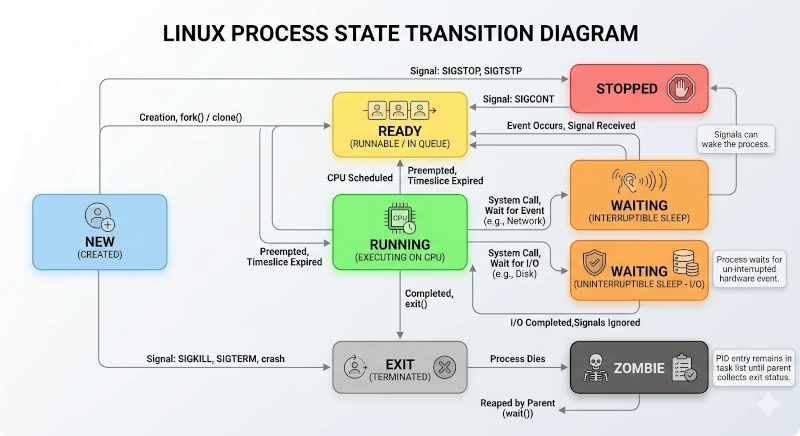
Process states
| State | Description |
|---|---|
| Running | The process is actively using the CPU |
| Sleeping (Interruptible) | The process is waiting for an event (I/O, signal) and can be interrupted |
| Sleeping (Uninterruptible) | The process is waiting for hardware I/O and cannot be interrupted |
| Stopped | The process has been temporarily paused (typically by a SIGSTOP signal) |
| Zombie | The process has finished execution but has not been cleaned up by its parent process |
Process hierarchy
Every process in Linux, except the very first one, has a parent process that spawned it. This structure creates a tree hierarchy. The first process executed by the kernel during boot is systemd (PID 1), which serves as the ancestor of all other processes. We can view the entire process tree using the command:
pstreeInter-Process Communication (IPC)
Processes need to communicate with one another. The kernel provides several IPC mechanisms:
- Pipe: A unidirectional data stream between two processes.
- Signal: Asynchronous notifications, such as SIGTERM to request a process to terminate.
- Shared memory: A memory area accessible by multiple processes.
- Socket: Bidirectional communication, including between different machines.
3.2.3 Memory Management
Memory management is one of the most critical functions within the kernel. The kernel must ensure every process receives its required memory while preventing unauthorized access to another process's memory space.
Virtual memory
Processes in Linux do not operate directly on physical RAM addresses. Instead, the kernel provides each process with the illusion of possessing its own large, contiguous memory space called a virtual address space. The kernel manages the mapping between the virtual addresses seen by the process and physical addresses (or actual RAM locations) via page tables. The smallest unit of this mapping is called a page, typically 4 KB in size.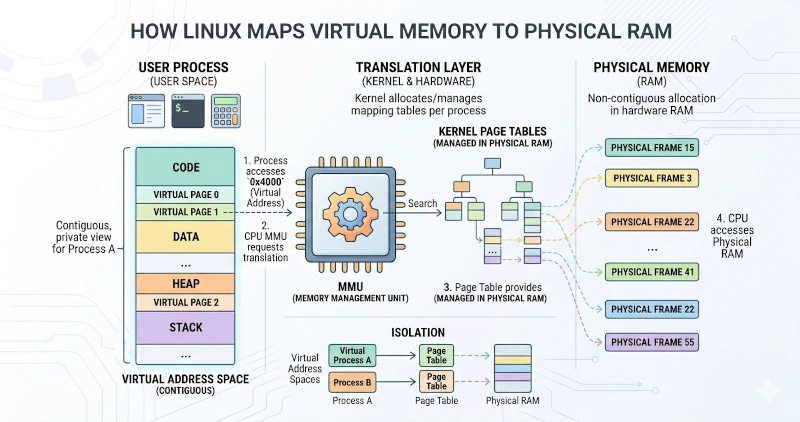
Virtual memory provides several advantages:
- Process isolation: Processes cannot access memory belonging to other processes, even when sharing physical RAM.
- Flexibility: Programs can act as though they have access to more RAM than physical capacity allows.
- Security: Memory exploitation becomes significantly more difficult to execute.
Demand paging
The kernel does not immediately allocate physical RAM when a process requests a memory block. It logs the request and only allocates a physical page when the process actually accesses that memory. This mechanism, called demand paging, efficiently manages memory without wasting RAM.
Swap
The kernel can move inactive memory pages to a dedicated storage area called swap when physical RAM fills up. These pages are paged back into RAM when needed again. This mechanism allows systems to run more programs than physical RAM capacity permits, albeit with a speed penalty if swap resides on a disk, given storage I/O latency compared to RAM. In Ubuntu 26.04 LTS, swap remains implemented as an on-disk swapfile generated automatically during installation; kernel-level zswap compression support is available but not enabled by default. Fedora Workstation, including version 44, takes a different approach: by default, it uses swap-on-zram, a compressed block device in RAM (/dev/zram0) that operates much faster than disk-based swap by avoiding storage I/O entirely. On-disk swapfiles in Fedora are created manually, such as when users wish to enable hibernation features.
OOM Killer
The kernel triggers the Out-Of-Memory (OOM) Killer under extreme conditions when RAM and swap are fully exhausted. This mechanism automatically terminates selected processes to reclaim memory and prevent a total system crash.
3.2.4 Hardware and Driver Management
The Linux kernel supports thousands of distinct hardware components, ranging from various CPU architectures, graphics cards, and audio devices to USB, Bluetooth, and laptop thermal sensors. This broad compatibility is enabled by the device driver system.
Device driver
A device driver is software acting as a translator between the kernel and hardware. Drivers understand how to communicate with specific hardware, including communication protocols, register access, and data transfer mechanisms, exposing these capabilities to the kernel through standardized interfaces.
Nearly all Linux drivers are included directly in the kernel source code (in-tree drivers), though out-of-tree drivers also exist and load separately, such as proprietary NVIDIA drivers. This inclusion is a primary reason for the Linux kernel's footprint size, as it ships built-in support for thousands of devices out of the box.
Device files
Linux adheres to the "everything is a file" philosophy. Hardware devices are represented as special files located in the /dev/ directory:
/dev/sda: The first SATA or SCSI disk./dev/nvme0n1: The first NVMe SSD./dev/tty1: The first terminal console./dev/input/mouse0: A mouse device./dev/null: A data sink that discards all input.
There are two primary types of device files:
- Block device: Devices that read or write data in blocks, such as hard drives and USB flash drives.
- Character device: Devices that stream data character-by-character, such as keyboards and serial ports.
udev: Device manager
udev is the device manager for the Linux kernel running in user space. When a USB drive is plugged in, the kernel detects it and notifies udev. udev then automatically creates the device file in /dev/, triggers appropriate scripts, and informs the system of the new hardware. udev integrates with systemd via the systemd-udevd daemon in both Ubuntu and Fedora.
Kernel parameters and /proc, /sys
The kernel exposes system and runtime data via two virtual filesystems readable like standard files:
/proc/: Contains details on running processes, kernel parameters, and system statistics./sys/(sysfs): Contains hardware structural information and configuration interfaces for drivers.
Files in these directories are generated dynamically by the kernel upon access and do not exist on disk storage.
3.2.5 Filesystem Management
A filesystem organizes how data is stored and retrieved on storage media. The Linux kernel supports dozens of distinct filesystems through an abstraction layer called the Virtual File System (VFS).
VFS defines standard operations like open, read, write, and close that each underlying filesystem implementation must provide. Applications read and write files without needing to know whether the data resides on ext4, XFS, Btrfs, or a network filesystem.
Common Linux Filesystems:
| Filesystem | Description |
|---|---|
| ext4 | Default across most Debian derivatives, including Ubuntu 26.04 LTS: mature, stable, and fast. |
| Btrfs | Default on Fedora Workstation (including Fedora 44) since Fedora 33 (2020): supports native snapshots, compression, and built-in volume management without needing LVM. |
| XFS | High-performance filesystem optimized for large files; default on Fedora Server, but not Fedora Workstation. |
| FAT32 / exFAT | Ensures compatibility with Windows environments and legacy media. |
| NTFS | Windows filesystem accessible via the kernel ntfs3 driver or NTFS-3G. |
| tmpfs | RAM-backed filesystem used for /tmp and /run: volatile contents are cleared on reboot. |
ext4 and XFS are journaling filesystems: both record intended modifications to a dedicated journal area before applying changes, allowing the filesystem to recover to a consistent state by replaying the journal after unexpected power loss. Btrfs achieves structural integrity using a copy-on-write (COW) model: rather than overwriting existing data directly, Btrfs writes changes to a new location first and updates metadata only upon completion, preventing partially written states during power outages. This COW model also powers native instant snapshot features in Btrfs.
3.3 GNU Utilities: Essential System Tools
A kernel operating in isolation provides minimal user utility. A baseline set of software utilities is required to construct a usable environment. This is where GNU Utilities come into play.
The GNU Project, initiated by Richard Stallman in 1983, produced hundreds of core utilities forming the foundation of Linux systems. The core groups include:
3.3.1 GNU Coreutils
GNU Coreutils contains the core commands relied upon daily in command-line environments. Without them, basic operations fail:
| Command | Function |
|---|---|
ls | Lists directory contents |
cp | Copies files and directories |
mv | Moves or renames files and directories |
rm | Removes files or directories |
mkdir | Creates new directories |
cat | Concatenates and prints file contents |
These commands and associated utilities ship across Linux distributions as core dependencies, though not all distributions execute the original GNU codebase. Ubuntu 26.04 LTS serves as a key example: starting in Ubuntu 25.10, Canonical transitioned to uutils, a Rust rewrite of coreutils intended as a drop-in replacement for GNU Coreutils, using it as the default implementation for approximately one hundred commands including ls, cat, mkdir, chmod, and sort. The goal is improved memory safety over legacy C code base implementations. Three core commands, cp, mv, and rm, temporarily retain GNU implementations due to TOCTOU (time-of-check to time-of-use) security considerations discovered in Rust implementations. Both versions remain installed side-by-side, allowing users to revert to GNU Coreutils via the package manager. Fedora Workstation continues to ship original GNU Coreutils packages.
3.3.2 GNU Binutils
GNU Binutils is a collection of binary handling tools used for object code manipulation and software compilation tasks. Key tools include ld (linker), as (assembler), and target analysis utilities.
3.3.3 GNU C Library (glibc)
glibc is the standard C library implementation on Linux systems. It represents a vital dependency, as nearly all compiled applications running on Linux link against glibc. It provides core functionality such as printf(), malloc(), file I/O handling, and System Call wrappers.
glibc functions as the bridge connecting user applications to the kernel. It wraps low-level system calls into standard C functions easier for developers to invoke. Unlike Coreutils, glibc has not been replaced by Rust alternatives and remains the core GNU implementation across both Ubuntu and Fedora platforms.
3.3.4 Bash (GNU Bourne Again Shell)
Bash is the default interactive command shell across many Linux distributions, including Ubuntu 26.04 LTS. Developed under the GNU Project, Bash is an enhanced open implementation of the original Bourne Shell (sh).
3.3.5 Systemd
Systemd is a core system component in modern Linux distributions, though it is not formally part of the GNU Project. Systemd operates as the init system, serving as the initial process executed by the kernel during boot (PID 1). It acts as the service manager, system logger, device manager, and coordinator for core system functions.
Adopting systemd historically sparked debate within the community, as its broad scope diverged from traditional Unix modularity philosophy. However, systemd now serves as the de facto init standard across major Linux distribution ecosystems, including the latest releases of Ubuntu 26.04 LTS and Fedora Workstation 44.
3.4 Shell: The Command-Line Interface
A Shell is a command interpreter that processes input commands from users or scripts, parses them, and executes commands directly or by launching external binaries. It serves as the primary interface between users and the operating system.
The term shell acts as a metaphor: it forms a outer shell around the kernel, protecting users from underlying kernel complexity while granting direct access to system capabilities.
3.4.1 How a Shell Operates
When entering a command at the terminal prompt and pressing Enter, the following sequence occurs:
- The shell reads the input string.
- The shell parses the string into the command name, flags, and arguments.
- The shell executes built-in commands directly (e.g.,
cd,echo). - For external programs, the shell searches environment paths specified in
$PATHto locate the executable file. - The shell forks a child process (fork) and runs the target application (exec).
- The shell waits for process completion and returns control to the command prompt.
Shells also provide interactive environment features:
- Redirection: Redirecting standard input/output streams to or from files (
>,<,>>). - Pipe: Chaining output from one command directly into input for another (
|). - Variables: Storing dynamic configuration parameters.
- Scripting: Automating sequences of commands in executable files.
- Tab completion: Auto-completing commands, paths, and options.
- History: Retaining command history buffers for reuse.
3.4.2 Common Shell Implementations
| Shell | Description |
|---|---|
| Bash | Default on Ubuntu: highly portable and widely supported. |
| Zsh | Popular interactive shell featuring advanced plugin support like Oh My Zsh. |
| Fish | Provides native syntax highlighting and auto-suggestions out of the box. |
| Dash | A lightweight shell linked to /bin/sh on Ubuntu for system script execution. |
The default login shell on Ubuntu is Bash, while /bin/sh links to Dash for system scripts due to fast execution speed. Bash also serves as the default shell on Fedora, with Zsh available as a popular alternative.
3.4.3 Shell vs. Terminal Emulator
Distinguishing between a shell and a terminal emulator is essential:
- A Terminal emulator (such as GNOME Terminal or Konsole) is a graphical application managing window rendering, keyboard input focus, and display output.
- A Shell is the command interpreter running inside the terminal instance executing commands.
The terminal provides display and input rendering services, whereas the shell performs command execution logic. Different shells can run inside the same terminal window seamlessly.
3.5 Desktop Environment: The Graphical User Interface
A Desktop Environment (DE) provides a complete Graphical User Interface (GUI) for users who prefer interacting beyond command-line interfaces. A DE supplies windows, desktop icons, menu structures, taskbars, notification panels, and interactive controls.
A DE is not a monolithic application, but a suite of integrated software components working together, including:
- Window manager: Controls window positioning, sizing, and frame decorations.
- Panel / taskbar: Displays application menus, clocks, status indicators, and task lists.
- File manager: Provides a visual interface for navigating directory structures.
- Settings manager: Offers central control panels for system configuration.
- Session manager: Manages user login, session state persistence, and logout sequences.
- Core app suite: Bundles integrated text editors, image viewers, calculators, and utility apps.
3.5.1 Primary Desktop Environments in Linux
GNOME
GNOME is the default desktop environment shipped with both Ubuntu and Fedora Workstation. It features a minimal interface design centered around the Activities Overview, top control bar, keyboard-centric workflows, and touchpad gestures.
KDE Plasma
KDE Plasma offers extensive customization options and a layout familiar to users transitioning from Windows. Distributions like Kubuntu ship with Plasma as their default desktop.
XFCE
XFCE is a lightweight desktop environment designed for minimal resource consumption, making it ideal for low-spec hardware setups.
3.5.2 Desktop Environments: Ubuntu vs. Fedora
| Aspect | Ubuntu 26.04 LTS | Fedora Workstation 44 |
|---|---|---|
| Default DE | GNOME 50 | GNOME 50 |
| Customization | Customized experience (Ubuntu Dock, Yaru theme, App Center) | Minimal customization (Vanilla GNOME experience) |
| Visual Layout | Left-docked panel by default (now opaque) | No persistent desktop dock |
Because both distributions ship with GNOME 50, differences in user experience stem primarily from desktop layout customizations and distribution-specific default apps, rather than major upstream version disparities present in historical releases.
3.6 Display Server: X11 and Wayland
A display server manages communication between user space applications, window managers, and underlying graphics driver hardware. It orchestrates rendering windows and visual elements to physical displays.
3.6.1 The X Window System (X11)
The X Window System (X11) served as the standard display server protocol on Linux for over three decades. X11 relies on a network-transparent client-server model where the X server handles input device events and hardware display output, while X clients represent connected applications. Legacy architecture overhead in X11 complicates implementing modern display features like HDR cleanly.
3.6.2 Wayland
Wayland is a modern display server protocol engineered to succeed X11. In Wayland, display server management integrates directly into the compositor. The compositor communicates directly with graphics hardware via kernel interfaces using KMS (Kernel Mode Setting) and DRM (Direct Rendering Manager).
Wayland provides enhanced security boundaries, smooth rendering performance, dynamic fractional scaling, and variable refresh rate (VRR) capabilities.
Wayland is no longer just the default configuration; it is the sole GNOME display session supported on both distributions. GNOME 50 on Ubuntu 26.04 LTS removed legacy X11 session options from GDM login menus, following earlier moves by Fedora Workstation. Legacy X11 applications continue running transparently via the Xwayland compatibility layer, though native X11 GNOME sessions are deprecated. Current session protocol types can be checked using:
echo $XDG_SESSION_TYPE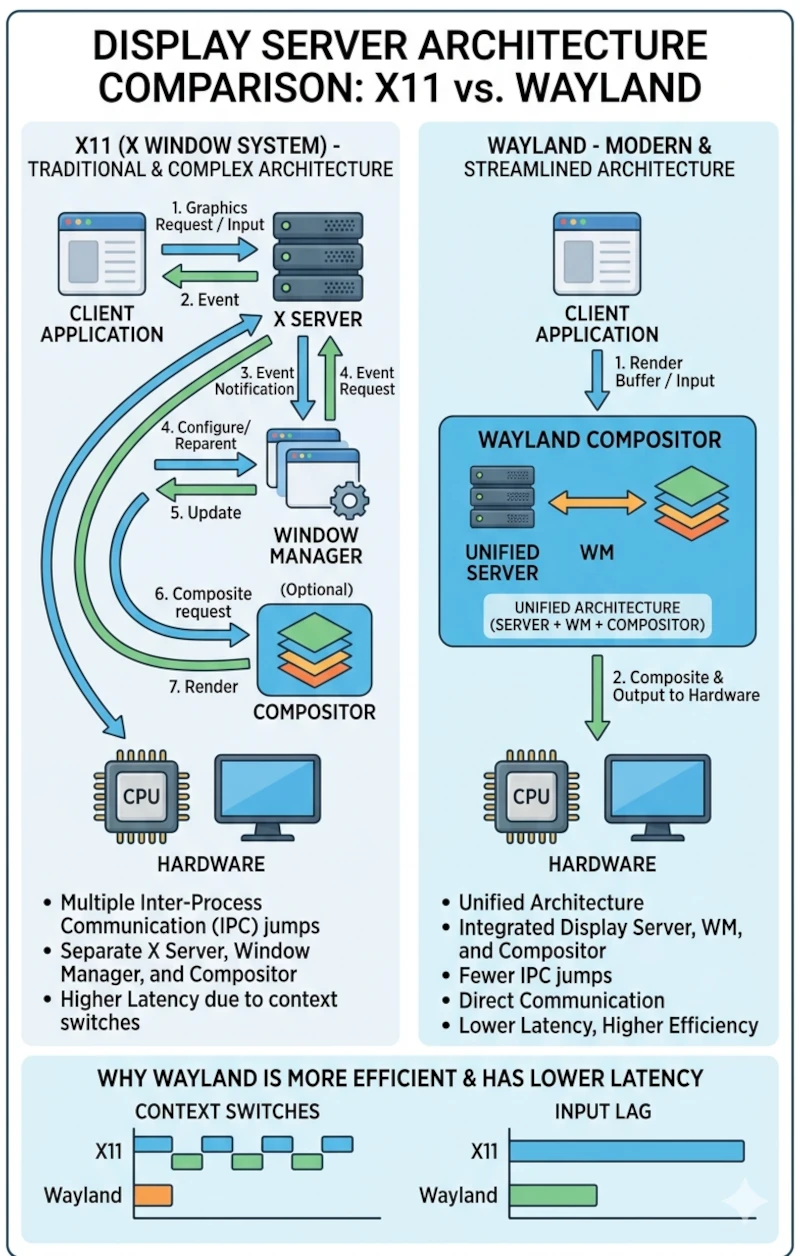
3.7 Package Managers: Software Installation Systems
A Package manager automates installing, updating, configuring, and removing software packages from a centralized system interface. Software packages are retrieved from repositories: verified remote servers holding thousands of precompiled software builds.
Package management advantages include cryptographic software verification, automated dependency resolution, and system-wide updating via single management commands.
3.7.1 Distribution Package Ecosystems
APT (Advanced Package Tool): Ubuntu
Ubuntu uses the Debian package system (.deb) managed via APT toolsets.
sudo apt update
sudo apt install package_name
sudo apt upgrade
DNF (Dandified YUM): Fedora
Fedora uses the RPM package system (.rpm) managed via DNF. Beginning in Fedora 44, all GUI application managers (including GNOME Software) execute via the core DNF5 (libdnf5) backend used by terminal dnf utilities, ensuring consistent execution behavior across environments.
sudo dnf check-update
sudo dnf install package_name
sudo dnf upgrade
3.7.2 Universal Package Formats
Flatpak and Snap represent universal packaging formats that run across different Linux distributions. Flatpak executes software applications within isolated sandbox environments. Fedora 44 enables Flathub repository access by default, whereas Ubuntu 26.04 LTS utilizes Snap packaging for integrated application delivery. Ubuntu 26.04 LTS features the unified App Center, combining Deb, Snap, and Flatpak management into a unified GUI interface.
3.8 How All Components Interact
Executing a simple action like opening the Firefox browser triggers interactions across system layers:
- The Desktop Environment captures a click on the Firefox application launcher.
- GNOME instructs the Shell service to spawn the binary execution request.
- The Kernel allocates memory segments and creates a process entry for Firefox.
- Firefox connects to the Wayland compositor to create window surface buffers.
- The Wayland compositor requests the Kernel render pixel arrays to hardware displays via GPU drivers.
- Firefox calls networking abstractions via glibc, triggering system calls to the Kernel to fetch remote web content.
- The Kernel invokes network card drivers to process inbound network packets from local interfaces.
- Firefox renders the retrieved web page and pushes frames to the display output via the Wayland compositor.

3.9 Summary
- The Linux kernel is the central core managing system processes, RAM allocation, hardware drivers, and storage filesystems.
- GNU Utilities complement the kernel to form a functional operating system, though some component utilities are being replaced by Rust rewrites in distributions like Ubuntu.
- The Shell provides the command-line interface environment for parsing and running user commands.
- Desktop Environments provide graphical user interfaces, such as GNOME, to abstract complex tasks visually.
- Display Servers handle graphics rendering, with Wayland acting as the standard default session across modern releases.
- Package Managers automate software delivery, dependency management, and security updates via official repositories.
Understanding these underlying architecture layers provides a navigational map for system operations. When applications fail to execute properly, users can isolate whether issues stem from kernel modules, runtime libraries, shell environments, or desktop components. When dependency errors occur, the functional role of package managers becomes clear. This structural knowledge provides a framework for reviewing technical documentation, troubleshooting errors systematically, and mastering Linux platform architectures.