
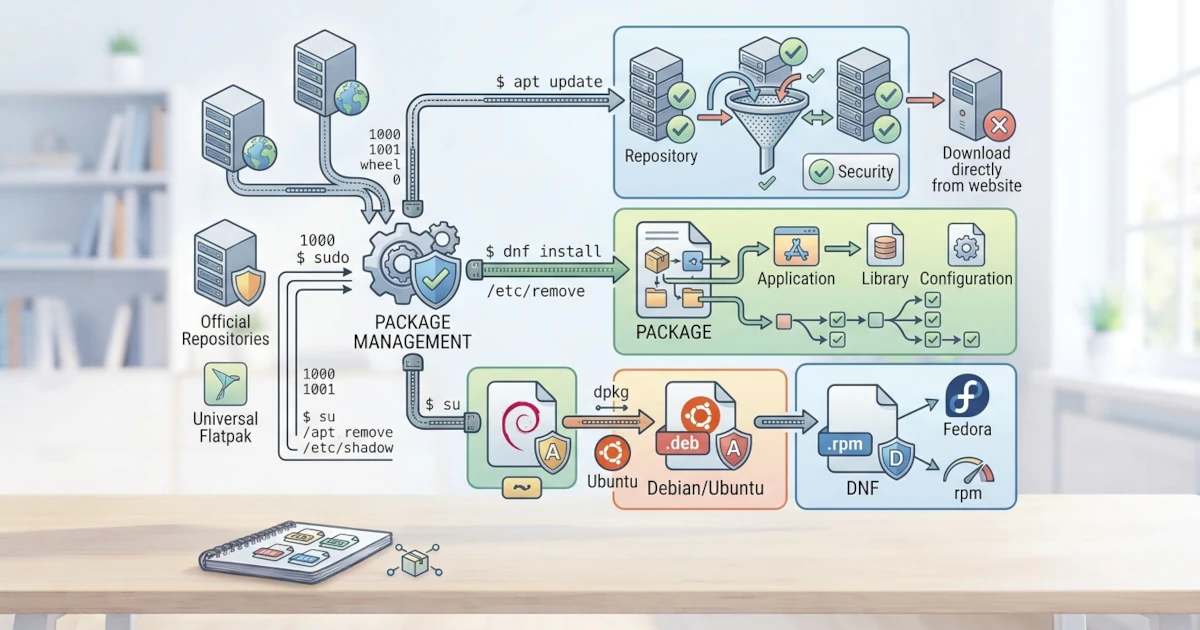
The way we install software on Linux differs from the common habit on Windows, where we typically download an installer from a website and run it. On Linux, software is managed through a system called a package manager. This chapter lays the conceptual foundation before we put APT and DNF into practice in subsequent chapters. We will understand what a package and a package manager are, why this approach is safer and more practical, the role of repositories, dependency issues, and the two main ecosystems used by Ubuntu and Fedora.
24.1 What Are Packages and Package Managers?
A package is an archive file containing all components required for a software application to run, such as the program itself, libraries, configuration files, and metadata. This metadata includes information such as the name, version, description, and a list of other required packages.
A package manager is a tool that manages these packages. Its tasks include searching for, downloading, installing, updating, and removing packages. The package manager also checks digital signatures to ensure that packages originate from trusted sources, and it handles dependencies between packages automatically.
24.2 Why Not Download Directly from Websites?
At first, downloading installers directly from websites may feel familiar. However, this approach introduces several issues that make it less ideal on Linux.
- Scattered updates. Every application must be updated manually one by one, and each uses its own update mechanism.
- Security risks. Users must verify themselves that downloaded files are authentic and unmodified, with no guarantee of verified signatures.
- Unresolved dependencies. Users must manually install all supporting libraries required by an application.
- Difficulty removing software. Completely removing an application along with all its associated files is often difficult.
Through a package manager, all these issues are addressed from a single place. All software is updated using a single command, authenticity is verified, and dependencies are resolved automatically. In practice, new users transitioning from Windows often still attempt to download generic installers from the internet out of old habits, only to end up confused when those files cannot be executed directly or clash with library versions already managed by the package manager. Getting accustomed to searching for applications via the package manager first, and only turning to other sources if an application is truly unavailable, is a habit worth adopting from the beginning of learning Linux.
24.3 Repository: The Software Package Source
Package managers retrieve packages from repositories, which are collections of packages stored on official servers and maintained by each distribution. Ubuntu retrieves packages from Canonical repositories, whereas Fedora retrieves them from Fedora Project repositories. In addition to official repositories, third-party repositories are also available, such as RPM Fusion on Fedora, as well as application stores like Flathub that provide applications in the Flatpak format.
Because packages originate from curated and digitally signed repositories, the risk of installing malicious software is significantly lower compared to downloading from random websites on the internet.
24.4 Dependency: Inter-Package Dependencies
Almost no software operates entirely on its own. Most applications rely on dependencies, which are other packages that must be present for the application to function properly. For example, an image processing application might require a specific library to read certain file formats.
Managing dependencies manually is exhausting and prone to conflicts, a problem historically known as dependency hell. Modern package managers solve this issue by calculating all dependencies automatically and downloading whatever is needed when installing a package. When a package is removed, the package manager can also clean up dependencies that are no longer in use. In practice, dependency hell most commonly re-emerges when sysadmins force software installations from source code or standalone binary files outside the package manager: the package manager has no knowledge of manually placed files, making it impossible to manage or clean them up, which makes library version conflicts harder to trace.
24.5 Two Main Ecosystems: APT and DNF
Each distribution family has its own package manager and package format. The two main ecosystems relevant to this series are as follows.
| Ecosystem | Package Manager | Package Format |
|---|---|---|
| Debian/Ubuntu | APT (apt) | .deb |
| Red Hat/Fedora | DNF (dnf) | .rpm |
APT is the package manager for Ubuntu and the Debian family, while DNF is the package manager for Fedora and the Red Hat family. Both perform the same core function, differing only in commands and package formats. Note that in recent releases, the dnf command in Fedora (including Fedora Workstation 44) is actually driven by a new engine named DNF5, a C++ rewrite of DNF that replaces the older Python-based version. For daily usage, the commands typed remain identical (dnf install, dnf remove, and so on), but the underlying engine is now faster and is also used by graphical applications like GNOME Software. We will explore APT in depth in the next chapter, followed by DNF in the chapter after that.
24.6 Package Formats: .deb and .rpm
The .deb and .rpm packages are essentially archives containing program files, metadata, and scripts executed during installation. The .deb format is used by Debian-based systems and is managed by a tool named dpkg under APT. The .rpm format is used by Red Hat-based systems and is managed by a tool named rpm under DNF.
Regarding the digital signatures mentioned earlier in this chapter, RPM 6.0, the latest generation of the rpm tool present since Fedora 43 and still used in Fedora Workstation 44, introduces significantly stricter signature verification at the rpm level itself. By default in its upstream version, RPM 6.0 will refuse to install .rpm packages that lack valid signatures unless explicitly bypassed using options such as --nosignature. However, Fedora has not enabled such strict behavior by default in Fedora Workstation 44. The rpm tool in Fedora 44 still follows the older, more permissive practice of verifying signatures if present without strictly requiring them, with strict enforcement scheduled to become default starting in Fedora 45. DNF itself has required valid signatures by default for a long time, so upcoming changes at the rpm level simply align it with security practices already implemented in DNF.
In addition to these two classic formats, universal formats such as Flatpak and Snap have emerged that run across various distributions. Both will be covered in a dedicated chapter after APT and DNF.
24.7 Summary
- A package is an archive containing programs, libraries, configuration files, and metadata; a package manager manages installation, updates, and removal centrally from one place.
- Installation via a package manager is safer and more practical than downloading manual installers because packages are verified for authenticity and dependencies are resolved automatically.
- Repositories are official package sources curated and signed by each distribution, making the risk of installing malicious software significantly lower.
- Dependencies are other packages required by an application to run; modern package managers calculate and resolve them automatically, including cleaning up unused dependencies.
- APT with the
.debformat is the package management ecosystem for Ubuntu and the Debian family, whereas DNF with the.rpmformat belongs to Fedora and the Red Hat family. - Besides
.deband.rpm, universal formats such as Flatpak and Snap are available for cross-distribution use.
Understanding the concept of package management is key to working efficiently and securely in Linux. Through a package manager, we install, update, and remove software from a single trusted source without worrying about dependencies or file authenticity. In the next chapter, we will put APT into practice to manage software on Ubuntu 26.04 LTS, starting from apt update to managing repositories and manually installing .deb files.