
Docker Swarm is sufficient for many container orchestration cases, but as the cluster scale grows and scheduling requirements become more complex (autoscaling based on custom metrics, more granular self-healing, or integration with multiple cloud providers at once), Sysadmins/DevOps Engineers in the field more often encounter Kubernetes as the de facto standard for container orchestration in the industry. This chapter discusses an overview of Kubernetes, starting from its origins and core components, fundamental differences with Docker, its position within the broader container orchestration ecosystem, to the practical path of migrating workloads from Docker Compose to Kubernetes manifests. The discussion in this chapter is purely introductory; production cluster installation, in-depth configuration of Kubernetes objects, or writing complex YAML manifests are not within the scope of this chapter.
39.1 What Is Kubernetes
Before comparing Kubernetes with Docker, it is important to first understand what Kubernetes actually is and where it comes from. This section covers the brief history of Kubernetes, its main architectural components, and how to try out a local cluster for learning purposes.
39.1.1 History and Origins from Borg
Kubernetes is an open-source container orchestration platform that automates deployment, scaling, and management of containerized applications across multiple hosts simultaneously. Its core concepts, such as Pod, Service, and Label, are derived from Borg, an internal cluster manager system that Google used for years to run workloads at massive scale in their own data centers.
Google announced Kubernetes as an open-source project in June 2014, opening access to much of the experience and design that was previously only used internally via Borg. A year later, coinciding with the release of Kubernetes version 1.0, Google donated the project as the seed technology for the formation of the Cloud Native Computing Foundation (CNCF) under the Linux Foundation, with Kubernetes as the first project hosted by CNCF. Since then, Kubernetes has been developed openly by a cross-company community, no longer unilaterally controlled by Google alone, and the name "Kubernetes" is often abbreviated as K8s (the number 8 represents the eight letters between "K" and "s").
39.1.2 Main Architectural Components
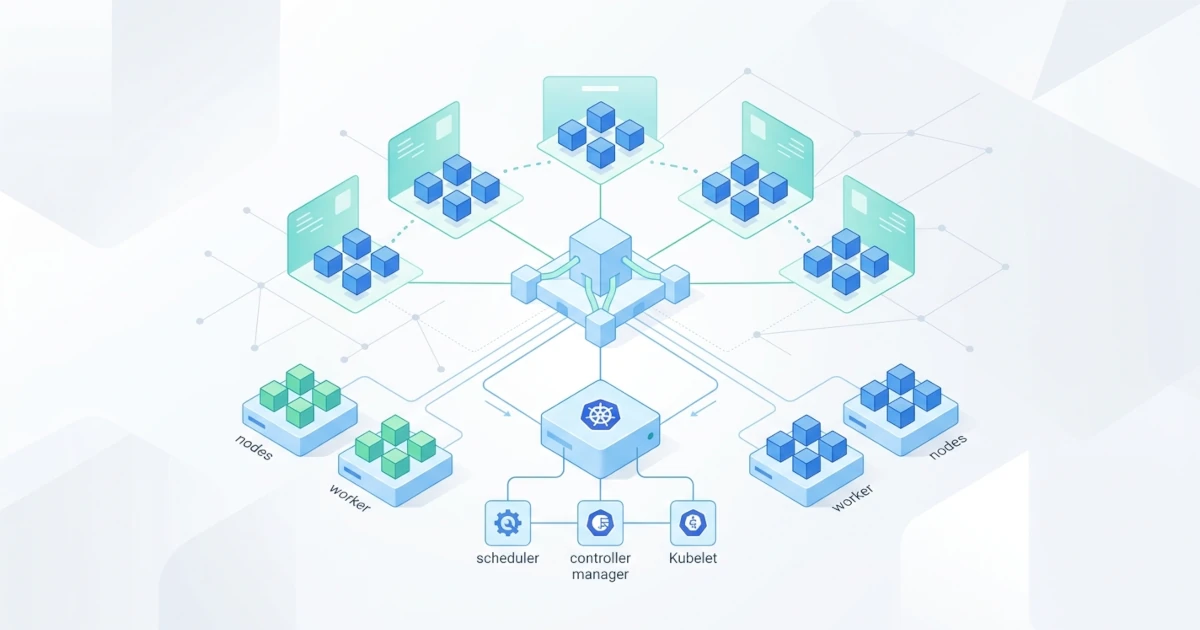
A Kubernetes cluster consists of two groups of components: the control plane which makes global decisions about the cluster (such as scheduling new workloads or detecting dead nodes), and nodes which run the actual container workloads. The control plane usually consists of the following core components, according to official Kubernetes documentation regarding cluster architecture:
kube-apiserver: the main entry point for communication to the cluster, where all commands (whether fromkubectlor other internal components) enter via REST API.etcd: a distributed key-value store that consistently stores all cluster configuration data and state.kube-scheduler: decides which node is best suited to run a new Pod, based on resource availability and applicable placement rules.kube-controller-manager: runs various controllers that continuously monitor the cluster state and adapt it to match the desired state (for example, adding replicas of a dead Pod).
Every worker node runs the kubelet component, an agent that ensures containers inside a Pod are actually running according to the specifications provided by the control plane, as well as kube-proxy which manages network rules so traffic can reach the right Pod. The smallest schedulable unit in Kubernetes is not a container directly, but a Pod, which is one or more containers sharing the same network namespace and storage, always scheduled together onto the same node.
39.1.3 Trying a Local Cluster for Learning
Setting up a production Kubernetes cluster requires careful planning, but for learning and experimentation, Developers and Sysadmins/DevOps Engineers can use a small-scale local cluster such as minikube or kind (Kubernetes in Docker), which run full Kubernetes on a single machine via containers or virtual machines. Docker Desktop also provides an option to enable a single-node Kubernetes directly from its settings, without installing additional tools.
Once one of these options is active, verify that the cluster is running via the official Kubernetes CLI, kubectl.
kubectl cluster-infoKubernetes control plane is running at https://127.0.0.1:6443
CoreDNS is running at https://127.0.0.1:6443/api/v1/namespaces/kube-system/services/kube-dns:dns/proxyThe output above indicates that kubectl successfully connected to the active cluster control plane. If this command fails with a connection refused message, the most common real-world cause is that the local cluster is not yet actually active (for example, minikube start has not been executed) or the active kubectl context is pointing to another cluster; check the active context via kubectl config current-context before troubleshooting further.
39.2 Docker vs Kubernetes
Docker and Kubernetes are often juxtaposed as if they are mutually exclusive options, even though they operate at different layers and are commonly used together. This section explains the difference in scope between the two, the relationship between Kubernetes and container runtimes, and the conceptual mapping between Docker Compose and Kubernetes objects.
39.2.1 Scope and Role Differences
Docker, specifically Docker Engine, is a platform to build and run containers on a single host, complete with tooling to build images via Dockerfile, manage volumes, and configure container networking. Kubernetes sits one layer above it: Kubernetes does not build images or define how containers run from scratch; instead, it orchestrates pre-built containers (usually in the form of OCI images built with tools like Docker) across multiple nodes simultaneously, complete with scheduling, self-healing, and automated scaling.
The workflow of building images via docker build remains relevant and commonly used even if the final deployment runs on Kubernetes; Kubernetes replaces the role of Docker Engine as a multi-host container runtime orchestrator, not image build tooling. This comparison is similar to Docker Swarm discussed in a separate chapter, except Kubernetes offers much richer orchestration features (metrics-based autoscaling, diverse deployment strategies, and a broad plugin ecosystem) at the cost of a higher learning curve and operational complexity compared to Swarm.
39.2.2 Container Runtime and Container Runtime Interface
Kubernetes itself does not run containers directly; it communicates with the container runtime on each node through a standard interface called the Container Runtime Interface (CRI). Previously, Kubernetes had a special component called dockershim to bridge Docker Engine (whose API was not fully compatible with CRI) so it could still be used as a runtime, but this component was officially removed from kubelet starting from Kubernetes version 1.24, according to official Kubernetes release notes.
Since dockershim was removed, Kubernetes clusters generally use containerd or CRI-O as container runtimes, both of which implement CRI natively without needing additional bridge components. Interestingly, containerd itself is actually a core component that Docker Engine has long used under the hood to run containers; so even though Docker Engine as an entire platform is no longer used directly as a CRI runtime, its core component lives on in many modern Kubernetes clusters. Images built with docker build can still be run without issues on any Kubernetes cluster, because their format follows the OCI specification universally supported by containerd and CRI-O.
39.2.3 Mapping Compose Concepts to Kubernetes Objects
Developers already familiar with Docker Compose will find many concepts with equivalents in Kubernetes, although naming and behavioral details differ. The following table summarizes the rough mapping.
| Docker Compose | Kubernetes Equivalent | Notes |
|---|---|---|
| Container in a service | Pod | Pods can contain more than one container sharing a network namespace |
| Service (replica & image definition) | Deployment | Deployments manage the number of Pod replicas and rolling update strategies |
| Service discovery between containers | Service (Kubernetes object) | Same name, similar concept, but implementation differs from Docker Compose |
| Volume | PersistentVolume & PersistentVolumeClaim | Kubernetes separates physical storage definitions from usage claims |
| Environment variables & secrets in Compose file | ConfigMap & Secret | Kubernetes separates ordinary configuration and sensitive data into two distinct objects |
Port mapping (ports:) | Service (NodePort/LoadBalancer type) & Ingress | Ingress specifically handles host- or path-based HTTP/HTTPS routing |
It should be noted that the term "Service" appears on both sides of the table with different meanings: a Service in Docker Compose is a single container definition along with its configuration, whereas a Service in Kubernetes is a network object that provides a stable address to access a set of Pods. This similarity in terminology often confuses developers transitioning from Compose to Kubernetes, so it is good to understand early on to avoid wrong assumptions when reading Kubernetes manifests.
39.3 Container Orchestration Ecosystem
Kubernetes is not the only player in the container orchestration space, although its position is currently the most dominant. This section covers Kubernetes' position among alternative orchestrators, the variety of available distributions and managed services, as well as supporting tooling commonly used alongside it.
39.3.1 Kubernetes, Swarm, and Other Alternatives
Docker Swarm, discussed in a separate chapter, remains a valid choice for small to medium-scale clusters prioritizing setup simplicity, as it is directly integrated into Docker Engine without additional component installation. Kubernetes is better suited for more complex orchestration needs: multi-tenancy, custom metrics-based autoscaling, native integration with various cloud providers, or a much broader plugin ecosystem (networking, storage, security).
Besides Swarm and Kubernetes, there is also HashiCorp Nomad as a lighter orchestrator not limited to container workloads (it can also schedule binary processes or virtual machines), although its adoption in the industry is much smaller than Kubernetes. In practice, choosing an orchestrator is usually not about which feature is strictly "more advanced", but rather about fit for team size, workload complexity, and operational resources available to maintain the cluster.
39.3.2 Kubernetes Distributions and Managed Services
Running Kubernetes yourself from scratch (usually via tools like kubeadm) gives full control over cluster configuration, but also requires Sysadmins/DevOps Engineers to maintain all control plane components themselves, including version upgrades and recovery when components fail. As an alternative, major cloud providers offer managed Kubernetes services that handle most of the control plane operational burden, such as Amazon Elastic Kubernetes Service (EKS), Google Kubernetes Engine (GKE), and Azure Kubernetes Service (AKS).
For edge computing needs or resource-constrained environments, there are lightweight Kubernetes distributions like k3s, which trim non-essential components from the standard Kubernetes distribution so it can run on lower-spec hardware. On the other hand, platforms like Red Hat's OpenShift wrap Kubernetes with extra tooling (integrated CI/CD, developer console, built-in security policies) for enterprise needs. Choosing among these options usually depends on the team's readiness to handle cluster operations themselves versus the budget available for managed services.
39.3.3 Supporting Tooling Around Kubernetes
The Kubernetes ecosystem is also enriched by various supporting tools commonly used alongside the core cluster. Helm acts as a package manager for Kubernetes, wrapping a collection of YAML manifests into a package called a chart that can be installed, upgraded, or rolled back with a single command, similar to a package manager in Linux distributions but specifically for Kubernetes resources.
Kustomize provides a way to manage configuration variations across environments (such as staging vs production) without manifest duplication, via an overlay mechanism that overrides parts of the base configuration. For visual observability, tools like Lens or k9s offer interfaces (both GUI and terminal-based) to monitor and manage cluster resources without having to type kubectl commands one by one. All of these tools are optional; a Kubernetes cluster can still be fully operated and managed via kubectl alone, but these extra tools prove to accelerate daily workflows, especially as the number of managed manifests and environments grows.
39.4 Migration Path from Docker Compose to Kubernetes
Applications already running smoothly with Docker Compose on a single server do not always need to be rushed into Kubernetes. This section discusses when such a migration is relevant to consider, how to convert a Compose file into initial Kubernetes manifests, and manual adjustments usually still needed after the conversion process.
39.4.1 When Migration Is Needed
Docker Compose remains a solid choice for local development and small-scale deployments that fit on a single host. Migration to Kubernetes is usually only relevant for Sysadmins/DevOps Engineers to consider when concrete needs arise, such as: the application must be distributed across multiple nodes simultaneously to handle growing traffic loads, automated autoscaling based on resource metrics is required, or the organization needs advanced deployment strategies (like canary releases or blue-green deployments) that are not natively available in Docker Compose.
Migrating without such concrete needs risks adding operational complexity without proportional benefits, because maintaining a Kubernetes cluster (whether self-managed or managed) still demands understanding additional concepts compared to simply running docker compose up on a single server. Being honest about these extra operational costs is important so that migration decisions are genuinely based on scale requirements, not merely following trends.
39.4.2 Converting Compose Files with Kompose
Kompose is an official tool under the Kubernetes project that converts a docker-compose.yml into initial Kubernetes manifests, eliminating much of the work of writing manifests from scratch. Once kompose is installed, run the following command in the directory containing the Compose file to be converted.
kompose convert -f docker-compose.yml -o k8s/This command generates separate manifest files for each service (typically Deployment and Service) inside the k8s/ directory. Apply the generated manifests to the active cluster using kubectl.
kubectl apply -f k8s/Verify that the converted Pods are running with a Running status using the following command.
kubectl get podsIf any Pod shows a status of CrashLoopBackOff or ImagePullBackOff after the manifests are applied, check the details of the cause via kubectl describe pod POD_NAME and kubectl logs POD_NAME; the most common real-world causes are images inaccessible to the cluster (such as local images not yet pushed to a registry reachable by the nodes) or mandatory environment variables not re-defined in the converted manifests.
39.4.3 Post-Conversion Manual Adjustments
Manifests output by kompose convert are a good starting point, not a finished product ready for production use. Several manual adjustments almost always required include: adding readiness probes and liveness probes so Kubernetes knows when a Pod is truly ready to accept traffic or needs to be restarted (equivalent to the HEALTHCHECK concept in Dockerfile, but configured separately at the Kubernetes manifest level), setting CPU/memory resource requests and limits so the scheduler can place Pods efficiently and prevent a single Pod from exhausting node resources, and moving sensitive credentials from plain environment variables into Secret objects rather than leaving them in plain text within manifests.
Volumes that were bind mounts or named volumes in Compose also need to be remapped to a PersistentVolumeClaim matching the storage class available in the target cluster, since storage mechanisms in Kubernetes are not automatically identical to host folder mappings like bind mounts. The same applies to port mapping: if a service needs to be accessed from outside the cluster via a specific domain, an additional Ingress object is usually required, which is not automatically generated from standard ports: conversions. Reviewing every converted manifest line by line, rather than applying them raw into a production cluster, remains a mandatory step before an application is truly considered ready to run on Kubernetes. In practice, the errors most frequently missed are not in Deployment or Service specs, but in resource requests/limits and probes left empty because they had no direct equivalent in the Compose file, making them easy to overlook when teams rush to complete migration.