
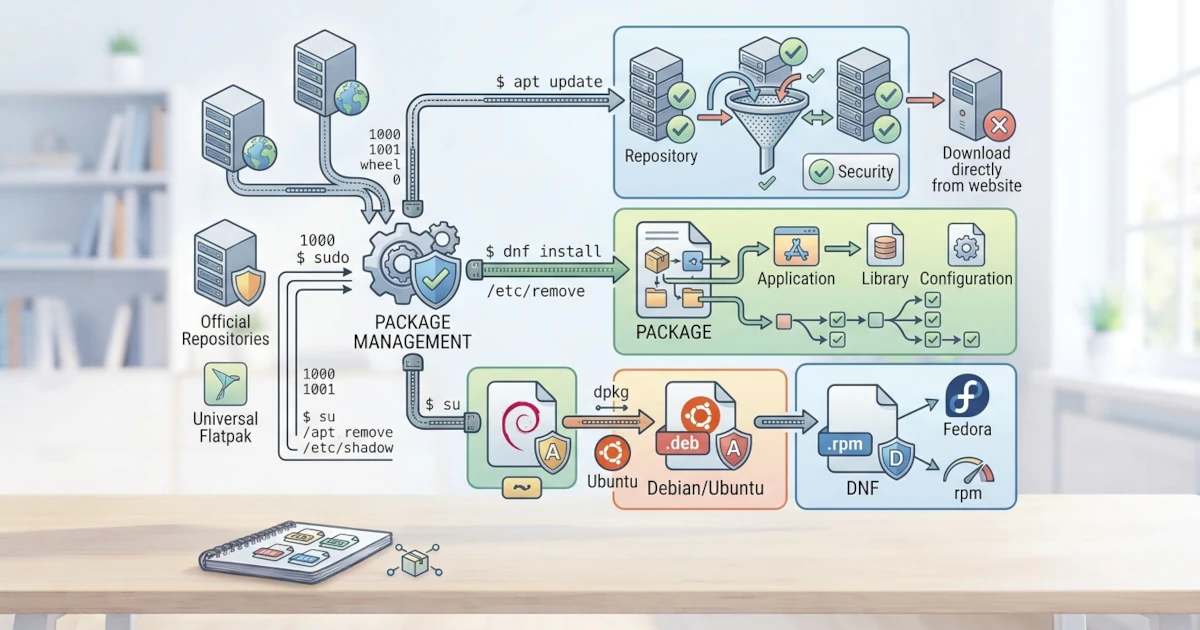
How you install software on Linux is different from the habit on Windows, where you generally download an installer from a website and then run it. On Linux, software is managed through a system called a package manager. This chapter lays the conceptual foundation before you practice APT and DNF in the following chapters. You will understand what a package and a package manager are, why this approach is safer and more practical, the role of repositories, the problem of dependencies, and the two main ecosystems used by Ubuntu and Fedora.
What Are Packages and Package Managers?
A package is an archive file that contains all the components required for a piece of software to run, such as the program itself, libraries, configuration files, and metadata. This metadata includes information like the name, version, description, and a list of other packages that are needed.
A package manager is a tool that manages these packages. Its tasks include searching, downloading, installing, updating, and removing packages. The package manager also verifies digital signatures to ensure the package comes from a trusted source, and handles dependencies between packages automatically.
Why Not Download Directly from a Website?
At first, downloading an installer directly from a website may feel familiar. However, this approach brings a number of problems that make it less than ideal on Linux.
- Scattered updates. Each application must be updated manually one by one, and each has its own update mechanism.
- Security risks. You have to verify for yourself that the downloaded file is authentic and unmodified, with no guarantee of verified signatures.
- Unresolved dependencies. You must install all supporting libraries required by the application yourself.
- Difficult to remove. Uninstalling an application and all its files completely is often cumbersome.
With a package manager, all of these problems are handled from a single place. All software is updated with a single command, its authenticity is verified, and its dependencies are resolved automatically.
Repositories: Sources of Software Packages
The package manager retrieves packages from a repository, which is a collection of packages stored on official servers maintained by each distribution. Ubuntu takes packages from Canonical's repository, while Fedora takes them from the Fedora Project's repository. In addition to the official repositories, there are also third‑party repositories such as RPM Fusion on Fedora, and application stores like Flathub that provide applications in the Flatpak format.
Because packages come from curated and signed repositories, the risk of installing malicious software is much lower than downloading from random sites on the internet.
Dependencies: Inter‑Package Dependencies
Almost no piece of software stands alone. Most applications depend on dependencies, which are other packages that must be present for the application to run. For example, an image‑processing application may need a library to read a specific file format.
Managing dependencies manually is very tedious and prone to conflicts, a problem that used to be known as dependency hell. Modern package managers solve this problem by automatically computing all dependencies and downloading whatever is needed when you install a package. When a package is removed, the package manager can also clean up dependencies that are no longer used.
The Two Main Ecosystems: APT and DNF
Each distribution family has its own package manager and its own package format. The two main ecosystems relevant to this series are as follows.
| Ecosystem | Package Manager | Package Format |
|---|---|---|
| Debian/Ubuntu | APT (apt) | .deb |
| Red Hat/Fedora | DNF (dnf) | .rpm |
APT is the package manager on Ubuntu and the Debian family, while DNF is the package manager on Fedora and the Red Hat family. Both perform the same functions, only differing in commands and package format. It is worth noting that since a few recent releases, the dnf command on Fedora (including Fedora Workstation 44) is actually powered by a new engine called DNF5, a rewrite of DNF in C++ that replaces the older Python‑based version. In day‑to‑day usage, the commands you type remain the same (dnf install, dnf remove, and so on), but the underlying engine is now faster and is also used by graphical applications like GNOME Software. You will study APT in depth in the next chapter and DNF in the chapter after that.
Package Formats: .deb and .rpm
.deb and .rpm packages are essentially archives that contain program files, metadata, and scripts that are run during installation. The .deb format is used by Debian‑based systems and is managed by a tool called dpkg underneath APT. The .rpm format is used by Red Hat‑based systems and is managed by a tool called rpm underneath DNF.
Speaking of digital signatures mentioned at the beginning of this chapter, Fedora Workstation 44 is the first release that enforces this strictly all the way down to the rpm level itself: following the new standard from RPM 6.0, any .rpm package that does not have a valid signature will be refused for installation by default, unless you deliberately bypass it with options like --nosignature. Previously, such strict checking was only enforced by DNF, while rpm itself was still lenient. Similar rules have long been the default in both APT and DNF, so this change merely aligns the lower layer with the security practices already in place at the higher layer.
In addition to these two classic formats, universal formats such as Flatpak and Snap are now developing, which can run across different distributions. Both will be covered in a dedicated chapter after APT and DNF.
Understanding the concept of package management is the key to working efficiently and safely on Linux. Through the package manager, you install, update, and remove software from a single trusted source, without worrying about dependencies or file authenticity. In the next chapter, you will immediately practice APT to manage software on Ubuntu 26.04 LTS, starting from apt update to managing repositories and manually installing .deb files.