
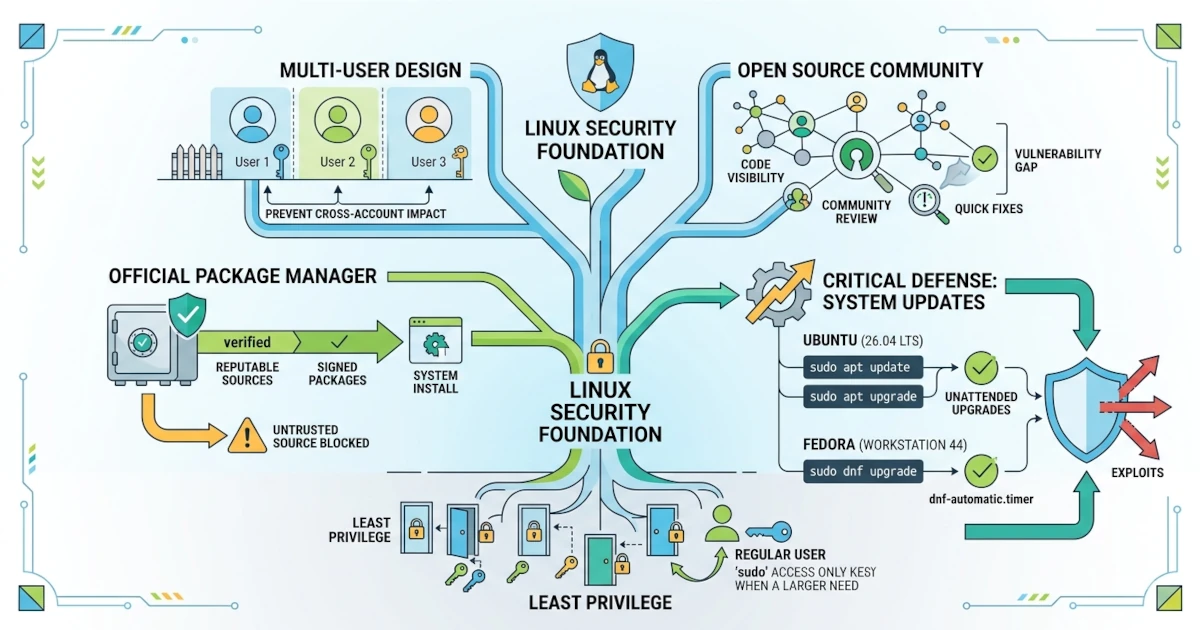
Security is one of the strong reasons why many people choose Linux. However, security does not come automatically without good habits. This chapter discusses the basic principles of security on Linux, why Linux is relatively more secure than other systems, and the role of system updates as your primary defense.
The Principle of Least Privilege
Least privilege is the principle that every user and program should only have the access rights strictly needed to perform its task. You have already encountered this principle when discussing sudo, where you run administrative commands only when necessary.
In practice, you work with a regular user account and use sudo for specific tasks. This way, if a program or your session is compromised, the damage it can cause remains limited because it does not run with full root privileges.
Interestingly, this principle continues to be strengthened down to the implementation level. Since Ubuntu 26.04 LTS, the sudo command you type is actually run by sudo-rs, a reimplementation of sudo written in the Rust language for memory safety. For everyday users, nothing changes in usage — the commands, options, and the /etc/sudoers file remain exactly the same — but the risk of security vulnerabilities due to memory bugs in the old C code is greatly reduced. The classic sudo implementation is still available as sudo.ws in case it is ever needed for compatibility.
Why Is Linux Relatively More Secure than Windows?
No system is completely immune, but Linux has a number of characteristics that make it relatively more secure.
- Multi-user design. From the start, Linux was designed for many users. Each user and process has restricted access rights, so a problem in one account does not automatically affect the entire system.
- Official package manager. As discussed, software is generally installed from official repositories that are curated and signed, so the risk of installing malicious programs is much smaller.
- Open source ecosystem. Linux source code is open for anyone to inspect. Vulnerabilities can be found and fixed quickly by the large worldwide community.
- Mandatory Access Control (MAC). In addition to the file permissions and ownership you have already learned about, Ubuntu and Fedora both enable an additional security layer that restricts what a program is allowed to do, regardless of which user runs it.
This MAC layer works behind the scenes and has different implementations on the two distributions. Ubuntu uses AppArmor, which is active by default and works based on file paths — for example, a program is only allowed to access specific directories and files according to its profile. Fedora uses SELinux in enforcing mode by default, which works based on security labels attached to every file and process. Both follow the same principle of "deny by default, allow explicitly", so even if an application is successfully exploited, the impact remains limited by the applicable profile or policy. The status of each can be checked with sudo aa-status on Ubuntu, or sestatus on Fedora.
The combination of these four factors makes Linux a harder target for attackers, especially in everyday desktop use.
System Updates as the Main Security Measure
One of the most important security habits is keeping the system updated. Most attacks exploit vulnerabilities that have actually already been fixed in the latest version, but are still present on systems that have not been updated.
sudo apt upgrade on Ubuntu
On Ubuntu 26.04 LTS, update the system with the following two commands.
sudo apt update
sudo apt upgrade
The first command refreshes the package list, while the second updates installed packages.
sudo dnf upgrade on Fedora
On Fedora Workstation 44, use the following command.
sudo dnf upgradeDNF automatically checks repository metadata before updating, so a single command covers both refreshing and updating. The dnf command you type on Fedora 44 is actually run by the DNF5 backend, the faster successor to DNF, but basic command syntax such as upgrade remains the same as before.
Automatic Updates
So that you do not forget to update, both distributions provide automatic update mechanisms.
Unattended Upgrades on Ubuntu
Ubuntu has the Unattended Upgrades feature that can download and install security updates automatically. This feature is generally enabled during installation, especially for security updates. You can check and configure it through the Software & Updates settings on the Updates tab, where options for automatic security updates are available.
dnf5-automatic on Fedora
Fedora 44 uses DNF5 as the package manager backend, so the package and systemd unit for automatic updates also follow the DNF5 naming. Install and enable this tool with the following commands.
sudo dnf install dnf5-plugin-automatic
sudo systemctl enable --now dnf5-automatic.timer
The commands above install the dnf5-plugin-automatic plugin and enable the dnf5-automatic.timer systemd timer, which runs update checks on a schedule. By default, this plugin only downloads updates; adjust the apply_updates option in the /etc/dnf/automatic.conf configuration file if you want updates to also be installed automatically, rather than only downloaded.
Security on Linux is built upon a foundation of good design and reinforced by your habits as a user. Apply the principle of least privilege, rely on official repositories, make use of the Mandatory Access Control layers that are already active by default, and keep the system updated. By doing so, you have already taken the most fundamental steps to keep your desktop safe. In the next chapter, you will deepen your knowledge of account security, including password management and the use of SSH.