
Without realizing it, we interact with Linux every day. When opening an app on an Android smartphone, accessing a favorite website, or using streaming services, all these activities almost certainly run on Linux servers. However, for many people, Linux still feels foreign and is considered to be used only by programmers with text-filled terminal screens. That picture is not entirely wrong, but it does not provide a complete understanding.
This first chapter will build the right understanding from the start. The discussion is not just about definitions, but also covers why Linux exists, how it works conceptually, and its relevance for anyone who wants a career in technology. We begin from the fundamental foundation: the definition of an operating system, the true nature of Linux, and its position in today's technology landscape.
Operating Systems and Their Role
We need to understand the definition of an operating system and why it exists before delving deeper into Linux.
A computer is a collection of hardware consisting of a processor, memory, storage, graphics card, keyboard, screen, and other components. All these components cannot communicate directly with each other nor run applications like browsers or games on their own. The role of the operating system is crucial in this situation.
An operating system (OS) is software that acts as an intermediary between the hardware and the user, including the applications the user runs. It manages all computer resources and provides an environment that allows other programs to run.
The OS performs the following functions:
- Process management: schedules which program gets to use the processor.
- Memory management: allocates and frees RAM for each running program.
- Storage management: organizes files on disk through the file system and manages read/write access.
- Hardware management: communicates with hardware through drivers so applications do not need to understand the technical details of each device.
- User interface: provides a way for users to interact with the computer through a command line or graphical user interface (GUI).
We would have to write programs in machine language and manually manage every hardware detail if there were no OS. That is highly impractical.
Microsoft Windows, Apple's macOS, and Linux are the most widely known OSes today. All three perform the same functions, but they use different approaches, philosophies, and architectures.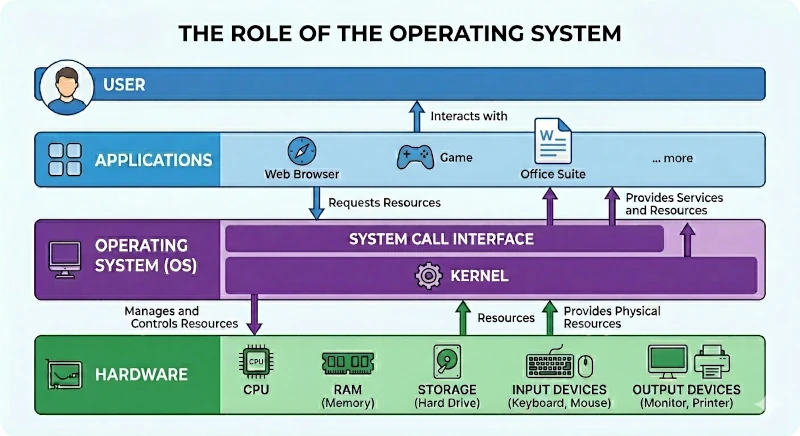
What Is Linux and What Is a Kernel?
Kernel: The Core of an OS
Every OS has a core part called the kernel. The kernel is the software layer that interacts directly with the hardware. Its job is to translate instructions from programs into commands understood by the processor, memory, and other hardware devices.
The kernel operates at the lowest level in a space called kernel space. This memory space is protected and can only be accessed by the kernel itself. The applications we run operate in user space and communicate with the kernel through system call mechanisms.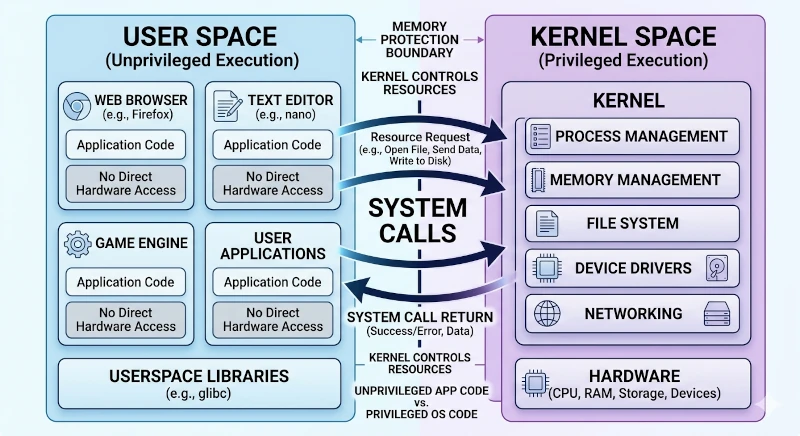
Linux: A Kernel, Not a Complete OS
Linux is the name of a kernel and is technically not the name of a complete OS.
Linus Torvalds, a 21-year-old student from Finland, created Linux and announced his project on August 25, 1991, on the comp.os.minix mailing list:
"I'm doing a (free) operating system (just a hobby, won't be big and professional like gnu) for 386(486) AT clones."
The Linux kernel is designed as a monolithic kernel. This means that most core functions such as process management, memory, drivers, and file systems run within a single integrated kernel space. This approach differs from a microkernel, which separates those functions into separate processes.
Ordinary users cannot use the Linux kernel directly. The kernel needs to be complemented with various components to become a complete OS, including:
- GNU utilities: a collection of basic programs like
ls,cp,mv, andbash, most of which come from the GNU project. - Shell: a command line interface as the interface for interacting with the system.
- Desktop environment (optional): a graphical display like GNOME or KDE Plasma.
- Package manager: a system for installing and managing software.
- Various other supporting components.
The combination of the Linux kernel with all these supporting components is packaged as a Linux distribution or distro, examples being Ubuntu, Fedora, Debian, Arch Linux, and hundreds of others.
Linux Kernel Versions
The Linux kernel is under active development with a release cycle of about every 9–10 weeks. The 6.x series, which had been running since 2022, officially ended with version 6.19, and was replaced by the 7.x series starting with Linux 7.0 released on April 12, 2026—note that this major version bump does not signify a major architectural change, but rather Linus Torvalds' habit of incrementing the major number once the minor number feels too large. Check the kernel version running on your system using the command:
uname -rLinux vs Windows vs macOS: A Brief Comparison
The following comparison helps us see the advantages and context of Linux against other OSes more clearly.
| Aspect | Linux | Windows | macOS |
|---|---|---|---|
| License | Open source (GPL) | Proprietary | Proprietary |
| Cost | Free | Paid | Free (tied to Apple hardware) |
| Source code | Open | Closed | Partially closed |
| Kernel | Linux kernel | Windows NT kernel | XNU kernel (Darwin) |
| Developer | Community + Companies | Microsoft | Apple |
| Customization | Very high | Limited | Very limited |
| Security | High by design | Vulnerable | Fairly high |
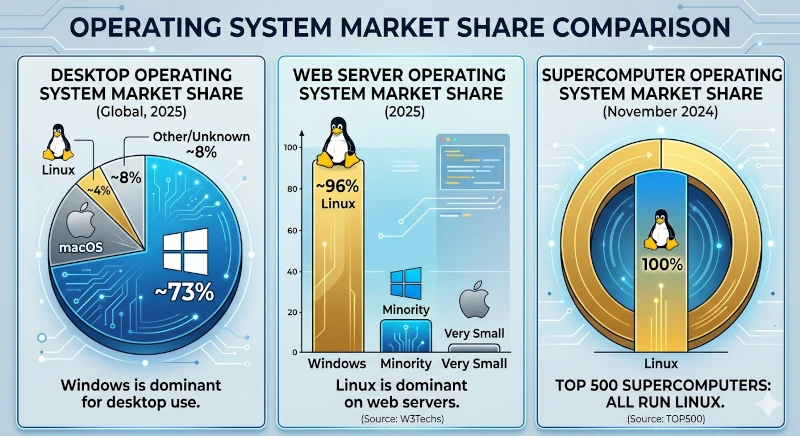
| Desktop usage | About 4% (2026) | About 60–65% | About 12–15% |
| Server usage | Dominant (About 96%) | Minority | Very small |
| Hardware support | Broad | Very broad | Apple hardware only |
Some important points:
- Linux is not a single product: Thousands of contributors from around the world develop Linux with support from organizations like the Linux Foundation. No single company owns it.
- Market dominance: Windows dominates the desktop sector, but Linux dominates the server, cloud, and embedded device sectors, from routers to Android smartphones.
- System basis: macOS is UNIX-based, so it shares conceptual similarities with Linux, but it is limited to Apple's hardware ecosystem.
- Market share figures are estimates: The desktop usage data above comes from web traffic tracking (e.g., StatCounter) and can vary significantly between months and between measurement sources, because this method does not directly count installed units.
Why Learn Linux?
The Workplace and Technology Careers
The technology industry heavily relies on Linux. Linux skills are a fundamental requirement for various career paths in technology.
Job market demand:
- Positions such as system administrator, DevOps engineer, site reliability engineer (SRE), and cloud engineer require Linux expertise.
- The largest cloud platforms like AWS, Google Cloud Platform (GCP), and Microsoft Azure run the majority of their workloads on Linux.
- Windows is still the most widely used primary OS among professional developers according to the Stack Overflow 2025 survey (about 49.5%), but various Linux distributions combined are used by a proportion of developers comparable to or exceeding macOS users (around 33%)—confirming Linux's position as a primary working environment, not just a niche OS, among professional developers.
Relevant certifications:
Many prestigious industry certifications are Linux-based, including:
- CompTIA Linux+
- LPIC-1 and LPIC-2 (Linux Professional Institute)
- RHCSA / RHCE (Red Hat Certified System Administrator / Engineer)
- CKA (Certified Kubernetes Administrator)
Software Development
Linux is the de facto standard development environment for software developers:
- Production servers: Web applications are almost certainly deployed to Linux servers. Developing in a similar environment reduces compatibility issues.
- Containers: The container ecosystem like Docker and Kubernetes was born and optimized for Linux. Kernel features like namespaces and cgroups are its foundation.
- Tooling: Many compilers, interpreters, and build tools are more stable on Linux.
- Git: Linus Torvalds created Git, and modern Git workflows thrive in the Linux ecosystem.
- WSL (Windows Subsystem for Linux): The presence of a Linux compatibility layer inside Windows proves how important Linux is for developers.
The Server and Cloud World
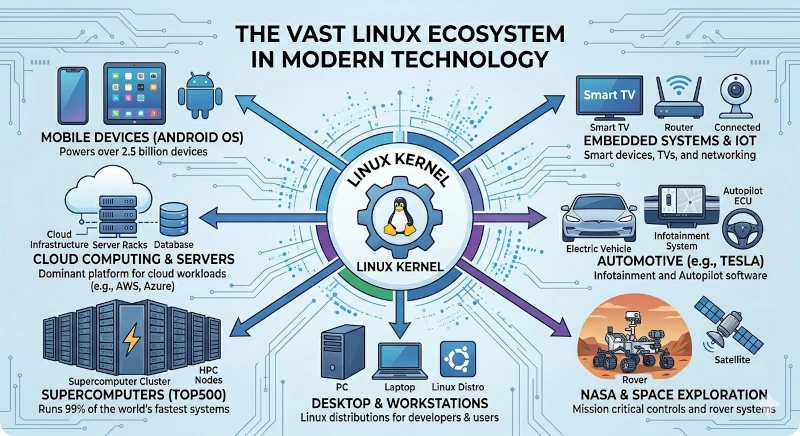
Linux is unmatched in this arena:
- Web servers: The majority of web servers on the internet run Linux. Apache and Nginx are optimized for this system.
- Cloud computing: The global cloud infrastructure is Linux-based and is the primary choice across various service providers.
- Supercomputers: All of the 500 fastest computers in the world use Linux.
- Android: The world's most popular mobile OS uses the Linux kernel.
- IoT and embedded systems: Smart devices such as routers, smart TVs, and automotive systems are largely Linux-based.
Who Uses Linux?
Linux is used by a very broad spectrum of users, from beginners to the largest organizations in the world.
Individual Users
- Developers: because of the strong tooling ecosystem and an environment consistent with servers.
- System administrators: because of full control over the system.
- Researchers and academics: because of flexibility, scripting capabilities, and access to scientific software that is often only available on Linux.
- Privacy and security enthusiasts: because of the auditable open source code and full control over what runs on the system.
- Desktop users: especially those who want a free alternative to Windows or macOS, or want to revive old computers.
Companies and Organizations
Some major organizations that rely on Linux include:
- Google: all of its server infrastructure runs on Linux. Android uses the Linux kernel.
- Meta (Facebook): operates one of the largest Linux infrastructures in the world.
- Amazon: AWS, one of the largest cloud services, is Linux-based. Amazon develops its own distribution: Amazon Linux.
- NASA: uses Linux for various scientific computing systems.
- New York Stock Exchange: uses Linux for its trading systems.
- Wikipedia: all of Wikipedia's server infrastructure runs on Linux.
- Tesla: the infotainment and autopilot systems use Linux.
- SpaceX: the Falcon 9 flight software system uses Linux.
Government
Governments in various countries are switching to Linux to save costs and reduce dependence on proprietary software:
- Germany (Munich): The city of Munich migrated about 15,000 computers to Linux through the LiMux project (2003–2013), but the city council decided to return to Windows in 2017 due to application compatibility issues and user dissatisfaction. Interestingly, Munich's new governing coalition recommitted to the principle of "Public Money, Public Code" since 2020 and reinforced that commitment in 2026 through the city's Open Source Program Office (OSPO)—showing that such large-scale migrations can reverse direction more than once.
- Germany (Schleswig-Holstein): Unlike Munich, the state of Schleswig-Holstein reported that about 80% of its government workplaces had moved from Microsoft software to open-source alternatives as of 2025, making it one of the most successful government Linux migrations in Europe today.
- France: In 2026, the French government announced a plan to migrate about 2.5 million government devices from Windows to Linux and other open-source software as part of its digital sovereignty efforts.
- India: BOSS Linux (Bharat Operating System Solutions) is developed by the Indian government.
- China: develops its own Linux-based distros (Kylin OS, Deepin) and promotes their use in government institutions.
- Brazil: was once one of the largest adopters of Linux in the government sector.
Summary
In this chapter we have built a foundation of understanding about Linux:
- An operating system acts as an intermediary between hardware and the user, managing computer resources.
- Linux is technically a kernel created by Linus Torvalds in 1991.
- Linux distros combine the kernel with various supporting software into a ready-to-use OS.
- Linux excels in open source, security, customization, and dominance in the server sector.
- Mastering Linux is highly relevant for modern technology careers such as DevOps and cloud computing.
- Linux users range from individuals to giant companies and government agencies worldwide.
In the next chapter, we will dive deeper into the history of Linux. The discussion will start from the origins of UNIX at Bell Labs in the late 1960s, the birth of the GNU project, to the emergence of the Linux kernel that changed the world's technology landscape.